SOAP web services examples
Spring Boot with Apache CXF example
Wednesday, January 24, 2018

Wednesday, August 9, 2017
Java 8 - Collectors
Collectors
One of the main advantages of functional-style programming over an imperative approach:you just have to formulate the result you want to obtain the “what” and not the steps you need to perform to obtain it—the “how.”
Collectors can be seen as advanced reductions.
Factory methods provided by the Collectors class offer three main functionalities:
- Reducing and summarizing stream elements to a single value
- Grouping elements
- Partitioning elements
Examples
// count the number of dishes in the menu, using the collector returned by the counting factory methodlong howManyDishes = menu.stream().collect(Collectors.counting());
// you can write this far more directly as
long howManyDishes = menu.stream().count();
// Calculate the average value of an Integer property of the items in the stream.
double avgCalories = menu.stream().collect(Collectors.averagingInt(Dish::getCalories));
// get the count, sum, average, maximum, and minimum of the calories contained in each dish with a single summarizing operation:
IntSummaryStatistics menuStatistics = menu.stream().collect(Collectors.summarizingInt(Dish::getCalories));
// joining internally makes use of a StringBuilder to append the generated strings into one.
String shortMenu = menu.stream().map(Dish::getName).collect(Collectors.joining(", "));
// maxBy - An Optional wrapping the maximal element in this stream according to the given comparator or Optional.empty() if the stream is empty.
Optional<Dish> mostCalorieDish = menu.stream().collect(Collectors.maxBy(Comparator.comparingInt(Dish::getCalories)));
// reducing - Reduce the stream to a single value starting from an initial value used as accumulator and iteratively combining it with each item of the stream using a BinaryOperator.
// using Collectors.reducing to get maximum calorie value
Optional<Dish> mostCalorieDish2 = menu.stream().collect(Collectors.reducing((d1, d2) -> d1.getCalories() > d2.getCalories() ? d1 : d2));
Integer mostCalorieValue = menu.stream().collect(Collectors.reducing(0, Dish::getCalories, Integer::max));
Stream.reduce method is meant to combine two values and produce a new one; it’s an immutable reduction.
Stream.collect method is designed to mutate a container to accumulate the result it’s supposed to produce.
groupingBy - Group the items in the stream based on the value of one of their properties and use those values as keys in the resulting Map.
Map<Dish.Type, List<Dish>> dishesByType = menu.stream().collect(Collectors.groupingBy(Dish::getType));
You pass to the groupingBy method a Function (expressed in the form of a method reference) extracting the corresponding Dish.Type for each Dish in the stream. We call this Function a classification function because it’s used to classify the elements of the stream into different groups.
Map<Dish.Type, Long> typesCount = menu.stream().collect(Collectors.groupingBy(Dish::getType, Collectors.counting()));
The result can be the following Map: {MEAT=2, FISH=4, OTHER=3}
collectingAndThen - Wrap another collector and apply a transformation function to its result.
int howManyDishes = menuStream.collect(collectingAndThen(toList(), List::size));
Map<Dish.Type, Optional<Dish>> mostCaloricByType = menu.stream().collect(
Collectors.groupingBy(Dish::getType,
Collectors.maxBy(Comparator.comparingInt(Dish::getCalories))));
There cannot be empty optional as value - key will not be present!
We can use Collectors.collectingAndThen factory method to get Dish instead Optional<Dish>
Map<Dish.Type, Dish> mostCaloricDishesByTypeWithoutOptionals = menu.stream().collect(
Collectors.groupingBy(Dish::getType,
Collectors.collectingAndThen(
Collectors.maxBy(Comparator.comparingInt(Dish::getCalories)),
Optional::get)));
// using Optional.get is safe because the reducing collector will never return an Optional.empty()
Partitioning
Partitioning is a special case of grouping: having a predicate (a function returning a boolean), called a partitioning function, as a classification function. The fact that the partitioning function returns a boolean means the resulting grouping Map will have a Boolean as a key type and therefore there can be at most two different groups—one for true and one for false.Map<Boolean, List<Dish>> partitionByVegeterian = menu.stream().collect(Collectors.partitioningBy(Dish::isVegetarian));
same functionality you can get with:
List<Dish> vegetarianDishes = menu.stream().filter(Dish::isVegetarian).collect(Collectors.toCollection(ArrayList::new));
Summary
- Collect is a terminal operation that takes as argument various recipes (called collectors) for accumulating the elements of a stream into a summary result.
- Predefined collectors include reducing and summarizing stream elements into a single value, such as calculating the minimum, maximum, or average.
- Predefined collectors let you group elements of a stream with groupingBy and partition elements of a stream with partitioningBy.
- Collectors compose effectively to create multilevel groupings, partitions, and reductions.
- You can develop your own collectors by implementing the methods defined in the Collector interface.
Ref
Sunday, August 6, 2017
Java 8 - Streams
A stream is a sequence of elements from a source that supports data processing operations.
Streams make use of internal iteration: the iteration is abstracted away through operations such as filter, map, and sorted.
There are two types of stream operations: intermediate and terminal operations.
Intermediate operations such as filter and map return a stream and can be chained together. They’re used to set up a pipeline of operations but don’t produce any result.
Terminal operations such as forEach and count return a nonstream value and process a stream pipeline to return a result.
The elements of a stream are computed on demand.
You can filter and slice a stream using the filter, distinct, skip, and limit methods.
You can extract or transform elements of a stream using the map and flatMap methods.
You can find elements in a stream using the findFirst and findAny methods. You can match a given predicate in a stream using the allMatch, noneMatch, and anyMatch methods.
These methods make use of short-circuiting: a computation stops as soon as a result is found; there’s no need to process the whole stream.
You can combine all elements of a stream iteratively to produce a result using the reduce method, for example, to calculate the sum or find the maximum of a stream.
Some operations such as filter and map are stateless; they don’t store any state. Some operations such as reduce store state to calculate a value. Some operations such as sorted and distinct also store state because they need to buffer all the elements of a stream before returning a new stream. Such operations are called stateful operations.
There are three primitive specializations of streams: IntStream, DoubleStream, and LongStream. Their operations are also specialized accordingly.
List<Integer> numbers = Arrays.asList(3,4,5,1,2);
int sum = numbers.stream().reduce(0, Integer::sum);
The problem with this code is that there’s an insidious boxing cost. Behind the scenes each Integer needs to be unboxed to a primitive before performing the summation - better to call sum method on stream:
int max = numbers.stream().reduce(0, (a, b) -> Integer.max(a, b));
// when there is no initial value, return value is Optional
Optional<Integer> min = numbers.stream().reduce(Integer::min);
min.ifPresent(System.out::println);
// count using map-reduce pattern
int count = numbers.stream().map(d -> 1).reduce(0, (a, b) -> a + b);
Common data processing idiom is finding whether some elements in a set of data match a given property. The Streams API provides such facilities through the allMatch, anyMatch, noneMatch, findFirst, and findAny methods of a stream.
The anyMatch method can be used to answer the question “Is there an element in the stream matching the given predicate?”
// Stream.of
Stream<String> stream = Stream.of("Java 8", "Lambdas", "In", "Action");
stream.map(String::toUpperCase).forEach(System.out::println);
// Stream.empty
Stream<String> emptyStream = Stream.empty();
// Arrays.stream
int[] numbers = {2, 3, 5, 7, 11, 13};
System.out.println(Arrays.stream(numbers).sum());
The Streams API provides two static methods to generate a stream from a function: Stream.iterate and Stream.generate. These two operations let you create what we call an infinite stream: a stream that doesn’t have a fixed size like when you create a stream from a fixed collection.
// Stream.iterate
Stream.iterate(0, n -> n + 2)
.limit(10)
.forEach(System.out::println);
// stream of 1s with Stream.generate
IntStream.generate(() -> 1)
.limit(5)
.forEach(System.out::println);
// fibonnaci with iterate
Stream.iterate(new int[]{0, 1}, t -> new int[]{t[1],t[0] + t[1]})
.limit(10)
. map(t -> t[0])
.forEach(System.out::println);
// find out the number of unique words in a file
Files.lines(Paths.get("/data.txt"), Charset.defaultCharset())
.flatMap(line -> Arrays.stream(line.split(" ")))
.distinct()
.count();
You use flatMap to produce one flattened stream of words instead of multiple streams of words for each line.
http://www.baeldung.com/java-8-streams
http://www.mkyong.com/java8/java-8-streams-filter-examples/
Streams make use of internal iteration: the iteration is abstracted away through operations such as filter, map, and sorted.
There are two types of stream operations: intermediate and terminal operations.
Intermediate operations such as filter and map return a stream and can be chained together. They’re used to set up a pipeline of operations but don’t produce any result.
Terminal operations such as forEach and count return a nonstream value and process a stream pipeline to return a result.
The elements of a stream are computed on demand.
You can filter and slice a stream using the filter, distinct, skip, and limit methods.
You can extract or transform elements of a stream using the map and flatMap methods.
You can find elements in a stream using the findFirst and findAny methods. You can match a given predicate in a stream using the allMatch, noneMatch, and anyMatch methods.
These methods make use of short-circuiting: a computation stops as soon as a result is found; there’s no need to process the whole stream.
You can combine all elements of a stream iteratively to produce a result using the reduce method, for example, to calculate the sum or find the maximum of a stream.
Some operations such as filter and map are stateless; they don’t store any state. Some operations such as reduce store state to calculate a value. Some operations such as sorted and distinct also store state because they need to buffer all the elements of a stream before returning a new stream. Such operations are called stateful operations.
There are three primitive specializations of streams: IntStream, DoubleStream, and LongStream. Their operations are also specialized accordingly.
Examples
/** get dish names that have less than 400 calories sorted by calories */
    public static List<String> getLowCaloricDishesNames(List<Dish> dishes) {

        return dishes.stream()

                .filter(d -> d.getCalories() < 400)

                .sorted(Comparator.comparing(Dish::getCalories))

                .map(Dish::getName)

                .collect(Collectors.toList());

    }
//* finds the first square that’s divisible by 3 */ List<Integer> numbers= Arrays.asList(1, 2, 3, 4, 5); Optional<Integer> firstSquareDivisibleByThree = numbers.stream() .map(x -> x * x) .filter(x -> x % 3 == 0) .findFirst(); // 9 /** sum the elements of a list of numbers */List<Integer> numbers = Arrays.asList(3,4,5,1,2);
int sum = numbers.stream().reduce(0, Integer::sum);
The problem with this code is that there’s an insidious boxing cost. Behind the scenes each Integer needs to be unboxed to a primitive before performing the summation - better to call sum method on stream:
int sum = numbers.stream().sum();
// find maximum element using reduce functionint max = numbers.stream().reduce(0, (a, b) -> Integer.max(a, b));
// when there is no initial value, return value is Optional
Optional<Integer> min = numbers.stream().reduce(Integer::min);
min.ifPresent(System.out::println);
// count using map-reduce pattern
int count = numbers.stream().map(d -> 1).reduce(0, (a, b) -> a + b);
Common data processing idiom is finding whether some elements in a set of data match a given property. The Streams API provides such facilities through the allMatch, anyMatch, noneMatch, findFirst, and findAny methods of a stream.
The anyMatch method can be used to answer the question “Is there an element in the stream matching the given predicate?”
    List<Integer> numbers = Arrays.asList(3,4,5,1,2);
    boolean anyMatch = numbers.stream().anyMatch(n -> n == 5);
Creating streams
Streams can be created not only from a collection but also from values, arrays, files, and specific methods such as iterate and generate.// Stream.of
Stream<String> stream = Stream.of("Java 8", "Lambdas", "In", "Action");
stream.map(String::toUpperCase).forEach(System.out::println);
// Stream.empty
Stream<String> emptyStream = Stream.empty();
// Arrays.stream
int[] numbers = {2, 3, 5, 7, 11, 13};
System.out.println(Arrays.stream(numbers).sum());
The Streams API provides two static methods to generate a stream from a function: Stream.iterate and Stream.generate. These two operations let you create what we call an infinite stream: a stream that doesn’t have a fixed size like when you create a stream from a fixed collection.
// Stream.iterate
Stream.iterate(0, n -> n + 2)
.limit(10)
.forEach(System.out::println);
// stream of 1s with Stream.generate
IntStream.generate(() -> 1)
.limit(5)
.forEach(System.out::println);
// fibonnaci with iterate
Stream.iterate(new int[]{0, 1}, t -> new int[]{t[1],t[0] + t[1]})
.limit(10)
. map(t -> t[0])
.forEach(System.out::println);
// find out the number of unique words in a file
Files.lines(Paths.get("/data.txt"), Charset.defaultCharset())
.flatMap(line -> Arrays.stream(line.split(" ")))
.distinct()
.count();
You use flatMap to produce one flattened stream of words instead of multiple streams of words for each line.
Ref
Java 8 in Action bookhttp://www.baeldung.com/java-8-streams
http://www.mkyong.com/java8/java-8-streams-filter-examples/
Java 8 - Lambdas
Behavior parameterization
Behavior parameterization is the ability for a method to take multiple different behaviors (or strategies) as parameters and use them internally to accomplish different behaviors.Behavior parameterization lets you make your code more adaptive to changing requirements and saves on engineering efforts in the future.
Passing code is a way to give new behaviors as arguments to a method. But it’s verbose prior to Java 8.
Anonymous classes helped a bit before Java 8 to get rid of the verbosity associated with declaring multiple concrete classes for an interface that are needed only once.
The Java API contains many methods that can be parameterized with different behaviors, which include sorting, threads, and GUI handling.
Strategy design pattern lets you define a family of algorithms, encapsulate each algorithm (called a strategy), and select an algorithm at run-time.
Lambda expression
A lambda expression can be understood as a concise representation of an anonymous function that can be passed around: it doesn’t have a name, but it has a list of parameters, a body, a return type, and also possibly a list of exceptions that can be thrown.
Let’s break it down:
- Anonymous— We say anonymous because it doesn’t have an explicit name like a method would normally have: less to write and think about!
- Function— We say function because a lambda isn’t associated with a particular class like a method is. But like a method, a lambda has a list of parameters, a body, a return type, and a possible list of exceptions that can be thrown.
- Passed around— A lambda expression can be passed as argument to a method or stored in a variable.
- Concise— You don’t need to write a lot of boilerplate like you do for anonymous classes.
A lambda expression is composed of parameters, an arrow, and a body.
Runnable r = () -> System.out.println("Hello!");Runnable r = () -> {};Callable<String> c () -> "Samara";Callable<String> c () -> "Samara" + 12;(Integer i) -> {return "Samara" + 22;} // return is control-flow statement. it has to be in curly braces(String s) -> {return "S";} // cannot stay just "S" when you have control-flow statement.You can use a lambda expression in the context of a functional interface.
Functional interface
Functional interface is an interface that specifies exactly one abstract method.@FunctionalInterface - optional annotation used to indicate that the interface is intended to be a functional interface.
Examples:
- java.util.Comparator<T>
- java.lang.Runnable
- java.util.concurrent.Callable<V>
- java.util.function.Predicate<T>
@FunctionalInterface
public interface Predicate<T> {
/** Evaluates this predicate on the given argument. */
    boolean test (T t);
}
You might want to use this interface when you need to represent a boolean expression that uses an object of type T .
public interface Consumer<T> {
/** Performs this operation on the given argument. */
void accept(T t);
}
You might use this interface when you need to access an object of type T and perform some operations on it
@FunctionalInterface
public interface Function<T, R> {
/** Applies this function to the given argument. */
R apply(T t);
}
You might use this interface when you need to define a lambda that maps information from an input object to an output.
@FunctionalInterface
public interface Supplier<T> {
/** Gets a result. */
T get();
}
Interfaces can also have default methods (that is, a method with a body that provides some default implementation for a method in case it isn’t implemented by a class). An interface is still a functional interface if it has many default methods as long as it specifies only one abstract method.
Lambda expressions let you provide the implementation of the abstract method of a functional interface directly inline and treat the whole expression as an instance of a functional interface (more technically speaking, an instance of a concrete implementation of the functional interface). You can achieve the same thing with an anonymous inner class, although it’s clumsier.
Primitive specializations
Java 8 brings a specialized version of the functional interfaces in order to avoid autoboxing operations when the inputs or outputs are primitives. To avoid boxing, use IntPredicate, not Predicate<Integer>.Exceptions
Note that none of the functional interfaces allow for a checked exception to be thrown. You have two options if you need a lambda expression to throw an exception: define your own functional interface that declares the checked exception, or wrap the lambda with a try/catch block (and you can re-throw runtime exception).Restrictions on local variables
A closure is an instance of a function that can reference nonlocal variables of that function with no restrictions. For example, a closure could be passed as argument to another function. It could also access and modify variables defined outside its scope.Now Java 8 lambdas and anonymous classes do something similar to closures: they can be passed as argument to methods and can access variables outside their scope. But they have a restriction: they can’t modify the content of local variables of a method in which the lambda is defined.
Those variables have to be implicitly final. It helps to think that lambdas close over values rather than variables. This restriction exists because local variables live on the stack and are implicitly confined to the thread they’re in. Allowing capture of mutable local variables opens new thread-unsafe possibilities, which are undesirable (instance variables are fine because they live on the heap, which is shared across threads).
Method references
Method references let you reuse existing method definitions and pass them just like lambdas. In some cases they appear more readable and feel more natural than using lambda expressions.
Lambda
|
Method reference equivalent
|
(Apple a) -> a.getWeight()
|
Apple::getWeight
|
() -> Thread.currentThread().dumpStack()
|
Thread.currentThread()::dumpStack
|
(str, i) -> str.substring(i)
|
String::substring
|
(String s) -> System.out.println(s)
|
System.out::println
|
You can think of method references as syntactic sugar for lambdas that refer only to a single method because you write less to express the same thing.
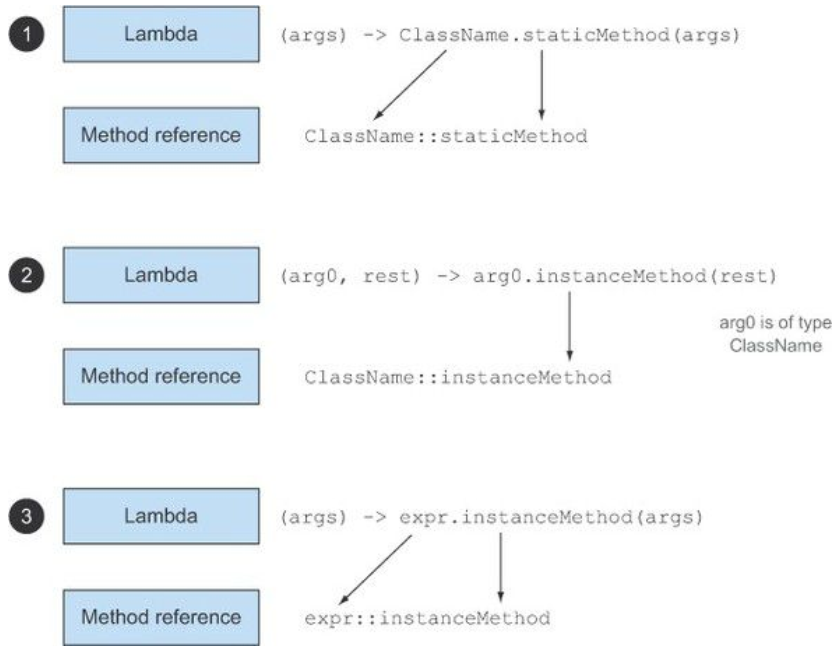
Recipe for constructing method references
There are three main kinds of method references:- A method reference to a static method (for example, the method parseInt of Integer, written Integer::parseInt)
- A method reference to an instance method of an arbitrary type (for example, the method length of a String, written String::length)
- A method reference to an instance method of an existing object (for example, suppose you have a local variable expensiveTransaction that holds an object of type Transaction, which supports an instance method getValue; you can write expensiveTransaction::getValue)
Constructor references
You can create a reference to an existing constructor using its name and the keyword new as follows: ClassName::new. It works similarly to a reference to a static method.Examples (normally you would not use new on Strings or on Integer class!)
  String s1 = new String();
  Supplier<String> createNewString = String::new;
  String s2 = createNewString.get();

  Integer i1 = new Integer(12);
  IntFunction<Integer> createNewInteger = Integer::new;
  Integer i2 = createNewInteger.apply(12);
Lambdas in practice
Pear has weight property. List<Pear> inventory = new ArrayList<>();
inventory.addAll(Arrays.asList(new Pear(70), new Pear(135), new Pear(110)));
// Use an anonymous class
inventory.sort(new Comparator<Pear>() {
public int compare(Pear p1, Pear p2){
return p1.getWeight().compareTo(p2.getWeight());
}});
// Use lambda expressions
inventory.sort((Pear p1, Pear p2) -> p1.getWeight().compareTo(p2.getWeight()));
// Java compiler could infer the types of the parameters of a lambda expression by using the context in which the lambda appears
inventory.sort((p1, p2) -> p1.getWeight().compareTo(p2.getWeight()));
// Comparator has a static helper method called comparing that takes a Function extracting a Comparable key and produces a Comparator object
inventory.sort(Comparator.comparing((a) -> a.getWeight()));
// Use method references // import static java.util.Comparator.comparing;
inventory.sort(comparing(Pear::getWeight));
inventory.sort(comparing(Pear::getWeight).reversed());
inventory.sort(comparing(Pear::getWeight).thenComparing(Pear::getCountry));
Ref:
Java 8 in Action book
Java 8: Behavior parameterization
Wednesday, July 12, 2017
Angular notes
Angular 4 notes
$ npm -v
Install Angular and create first project
- Install node.js (https://nodejs.org/en/)
- npm install -g @angular/cli
- ng new my-first-project
- cd my-first-project
- ng serve
- ** NG Live Development Server is listening on localhost:4200, open your browser on http://localhost:4200 **
Check Node and NPM version
$ node -v$ npm -v
Typescript
Install typescript
$ npm install -g typescript
Compile ts file:
$ tsc app.ts
Directives overview
There are three kinds of directives in Angular:
Components—directives with a template. (most common)
Structural directives—change the DOM layout by adding and removing DOM elements. (change the structure of the view e.g. *ngIf)
Attribute directives—change the appearance or behavior of an element, component, or another directive. (are used as attributes of elements e.g. ngStyle)
Ref
Friday, May 19, 2017
JavaScript notes
call JavaScript after page load
This can be used to hide some elements.
2 ways:
after DOM is constructed
<script>

 alert("page is loaded");

</script>
b) using jQuery - mostly placed in head section:
<script> $(document).ready(function() {
alert("page is loaded");
});
</script>Set visibility of items
Hide element based on selected item in dropdown list (<select>).
<script>
var optionList = document.getElementById('customerTypeSelection');
var customerTypeId = Number(optionList.options[optionList.selectedIndex].value.split(',', 1));
var acquirersRow = document.getElementById("Acquirers");

if (customerTypeId == 7) {

 acquirersRow.style.display = '';
} else {

 acquirersRow.style.display = 'none';
}

</script>
Monday, May 8, 2017
Ubuntu notes
Data and Time
display current date
$ datee.g Mon May 8 15:13:15 CEST 2017
change time zone
$ sudo dpkg-reconfigure tzdataor
$ sudo timedatectl set-timezone Europe/Dublin
Ref
https://help.ubuntu.com/community/UbuntuTimehttps://help.ubuntu.com/lts/serverguide/NTP.html
Tuesday, March 28, 2017
git notes
Git tools on windows
- Git for Windows (git bash as CLI)
- SourceTree (GUI for git)
Start git bash in specific directory on windows
Modify git bash shortcut - under Target:
instead
D:\Tools\Git\git-bash.exe --cd-to-home
put
D:\Tools\Git\git-bash.exe --cd=D:\git
Git usage
Clone repository
$ git clone URL
Switch to tag/branch
$ git checkout tags/<tag_name>List all tags
$ git tag -lRemove local repository
delete directory :)Revert changes
# Revert changes to modified files.$ git reset --hard
# Remove all untracked files and directories. (`-f` is `force`, `-d` is `remove directories`)
$ git clean -fd
Git stash
-- Stash the changes in a dirty working directory away
-- saves your local modifications away and reverts the working directory to match the HEAD commit.
$ git stash apply -- restore stashed files - you need to call git stash drop to remove files from stash!
$ git stash pop -- move files from stash into branch
## https://stackoverflow.com/questions/11269256/how-to-name-and-retrieve-a-stash-by-name-in-git
$ git stash save "guacamole sauce WIP"
$ git stash apply stash^{/guacamo}
or git stash apply stash@{n}
How to see remote location
$ git remote show originRef
Getting Started with Git @dzoneTutorial 1: Using branch
Git from the inside out
A successful Git branching model By Vincent Driessen
Friday, March 24, 2017
Ant notes
Multiple environments - properties overrides
By defining property files first one will override the next one that is defined:
 <property file="build.${user.name}.properties" description="Local customizations, overrides"/>

 <property file="build.properties" />
This means if you have property named databaseUrl defined in both files, the one with your username will have more precedence.
To ignore overrides that are based on user.name one can use antcall task instead depends and override params.
Example is bellow. In it you can override properties someParameter_1 and someParameter_2, by using antcall.
 <target name="dist">


  <antcall target="build">

   <param name="someParameter_1" value="newValue"/>

   <param name="someParameter_2" value="newValue"/>

  </antcall>


  <delete dir="${dist.dir}" />

  <mkdir dir="${dist.dir}" />


  <tar destfile="${dist.dir}/myProduct-${version}.tar.gz" compression="gzip">

   <tarfileset dir="${build.dir}" />

  </tar>

 </target>
Ref
Managing Multiple Build EnvironmentsBuilt-in Ant Properties
Apache Ant Wiki
AntCall
Thursday, March 2, 2017
Spring profiles
Requirement
Spring Profiles provide a way to segregate parts of your application configuration and make it only available in certain environments.I'm working on 2 applications:
- with Spring Boot (1.3)
- legacy Spring XML (Spring version 3.2.)
Requirements are to have active profiles define in properties file. This is easy and by default for Spring Boot application.
Setting active profiles in Spring Boot application
Define spring.profiles.active=myProfile inside properties file
Displaying active profile when application is starting:
 @Autowired

 protected Environment env;


 @PostConstruct

 void after() {

  String[] activeProfiles = env.getActiveProfiles();

  logger.info("\n** activeProfiles: " + Arrays.toString(activeProfiles));

 }
Setting active profiles in legacy Spring applications (Spring 3.2)
Defining profile for legacy Spring application was done in web.xml:
 <context-param>

  <param-name>spring.profiles.active</param-name>

  <param-value>myProfile</param-value>

 </context-param>
Read active profile inside JSP page:
String activeProfile = (String) pageContext.getServletContext().getInitParameter("spring.profiles.active");
To move this definition inside properties file, you need to implement org.springframework.context.ApplicationContextInitializer interface:
 @Override

 public void initialize(ConfigurableApplicationContext applicationContext) {

  ConfigurableEnvironment env = applicationContext.getEnvironment();

  try {

   env.getPropertySources().addFirst(new ResourcePropertySource("classpath:application.properties"));


   String profile = env.getProperty("spring.profiles.active");

   logger.info("env.getProperty('spring.profiles.active'): " + profile);


   String[] activeProfiles = env.getActiveProfiles();

   logger.info("env.getActiveProfiles: " + Arrays.toString(activeProfiles));


   // logger.info("changing active profile to ...");

   // env.setActiveProfiles("newProfile");

  } catch (IOException e) {

   logger.info("file not found...");

  }

 }
In web.xml register it as context-param:
 <context-param>

  <param-name>contextInitializerClasses</param-name>

  <param-value>hr.samara.demo.config.SamaraInitializer</param-value>

 </context-param>
After this change reading active profile in JSP page needs to change:
<%@page import="org.springframework.web.context.support.XmlWebApplicationContext"%>

<%@page import="org.springframework.web.context.support.WebApplicationContextUtils"%>


<%

ServletContext sc = pageContext.getServletContext();

WebApplicationContext applicationContext = WebApplicationContextUtils.getWebApplicationContext(sc);

String[] profiles = applicationContext.getEnvironment().getActiveProfiles();

%>
Ref:
http://www.baeldung.com/spring-profileshttps://www.mkyong.com/spring/spring-profiles-example/
spring-doc-Bean definition profiles
stackoverflow - How to set active spring 3.1 environment profile via a properites file and not via an env variable or system property
Wednesday, January 11, 2017
Oracle notes
How to restart database
connect as oracle user
$ sudo su - oracleRestart DB Instance
$ sqlplus sys/password as sysdba$ shutdown
$ startup
$ exit
Ref: Starting Up and Shutting Down
Restart Listener
$ lsnrctl stop$ lsnrctl start
$ lsnctl status
Listener setting
ORACLE_INSTALLATION_DIR\product\12.1.0\dbhome_1\NETWORK\ADMIN\listener.oraTuesday, December 20, 2016
Vagrant notes
Vagrant enables users to create and configure lightweight, reproducible, and portable development environments.
Start virtual machine.
After running this command, your computer should be left at a clean state, as if you never created the guest machine in the first place.
$ vagrant up
This command creates and configures guest machines according to your Vagrantfile.Start virtual machine.
$ vagrant ssh
This will SSH into a running Vagrant machine and give you access to a shell.$ vagrant halt
This command shuts down the running machine Vagrant is managing.$ vagrant destroy
This command stops the running machine Vagrant is managing and destroys all resources that were created during the machine creation process.After running this command, your computer should be left at a clean state, as if you never created the guest machine in the first place.
$ vagrant global-status
This command will tell you the state of all active Vagrant environments on the system for the currently logged in user.Ref:
https://www.vagrantup.com/docs/cli/Thursday, December 1, 2016
Connection to SVN on Win 10 machine with DirectAccess
There are 2 svn connectors:
- SVN Kit
- JavaHL Native
Tortoise and Eclipse plugins for SVN by default use JavaHL and that does not work over DA by default!
Direct Access goes over IPv6.
Subclise for Eclipse can be set to use SVN Kit or JavaHL as client.
By default SVN Kit goes over IPv6 but tortoise is using JavaHL and those two are incompatible. Errors like
revert C:/projects/internal/backoffice-sso svn: E200030: Index not exists: I_NODES_MOVED Index not exists: I_NODES_MOVED or An internal error occurred during: "Refresh SVN status cache".Can't overwrite cause with org.tmatesoft.svn.core.SVNException: svn: E155010: The node 'zzz_project' was not found.Tortoise SVN
Get version that supports IPv6.
Latest version, 1.9.5 does not have ipv6 version and does not work!
Eclipse
Download and install SlikSVN (https://sliksvn.com/download/)
Install Subclipse in Eclipse via update site, I have used version 4.2.x where update site is https://dl.bintray.com/subclipse/releases/subclipse/4.2.x/
After, verify SVN interface that is in use (Preferences - type SVN) is SilkSvn.
Subclipse 1.10.13 does not use SlikSVN as connector! I guess versions are incompatible: Subclipse uses JavaHL 1.9.3 and installed SlikSvn uses 1.9.4
Resources
Wednesday, October 5, 2016
SSO using SAML
Single Sign On using Security Assertion Markup Language
Few options
Identity Provider (IDP) is used for authentication purposes only. It is replacing login screen :)Service Provider (SP, application) will do authorization by reading roles from LDAP/database...
or
IDP will be used for authentication and authorization.
Problem with this approach is that SP does not know when role changes.
Session information can be stored using cookies on SP and IDP domain, so IDP can verify if user user is already logged on another SP.
Flow:
- User comes to SP (User is not logged. SP and IDP does not have any information about user)
- There is no session on SP for this user and user is redirected to IDP
- IDP authenticate user and send SAML response to SP
- SP validates SAML response and reads roles from datasource and the session is established
- User comes to SP2 (another application)
- SP2 does not have a session and asks IDP about this user.
- IDP knows this user has session so user is not provided with login screen. IDP reads data from datasource and returns SAML response to SP2
- SP2 validates SAML response and reads roles from LDAP
- User has seamlessly logged to SP2
IDP notes
IdP only reads, never having any sort of admin access. This helps security wise, knowing that authentication system can't write or retrieve sensitive information.Common problems
Problem
DEBUG (SAMLProcessingFilter.java:99) - Incoming SAML message is invalid

org.opensaml.ws.security.SecurityPolicyException: Validation of protocol message signature failed
Solution
Verify that SP and IDP have proper metadata.Problem
14:54:00.798 [http-nio-8082-exec-6] DEBUG (SAMLProcessingFilter.java:99) - Incoming SAML message is invalid

org.opensaml.ws.security.SecurityPolicyException: Validation of protocol message signature failed

 at org.opensaml.common.binding.security.SAMLProtocolMessageXMLSignatureSecurityPolicyRule.doEvaluate(SAMLProtocolMessageXMLSignatureSecurityPolicyRule.java:138)

 at org.opensaml.common.binding.security.SAMLProtocolMessageXMLSignatureSecurityPolicyRule.evaluate(SAMLProtocolMessageXMLSignatureSecurityPolicyRule.java:107)

 at org.opensaml.ws.security.provider.BasicSecurityPolicy.evaluate(BasicSecurityPolicy.java:51)

 at org.opensaml.ws.message.decoder.BaseMessageDecoder.processSecurityPolicy(BaseMessageDecoder.java:132)

 at org.opensaml.ws.message.decoder.BaseMessageDecoder.decode(BaseMessageDecoder.java:83)

 at org.opensaml.saml2.binding.decoding.BaseSAML2MessageDecoder.decode(BaseSAML2MessageDecoder.java:70)

 at org.springframework.security.saml.processor.SAMLProcessorImpl.retrieveMessage(SAMLProcessorImpl.java:105)
Solution
Add IDP public key for signing messages to java key store. It can be found in incoming saml message from IDP.http://stackoverflow.com/questions/23059203/http-status-401-authentication-failed-incoming-saml-message-is-invalid-with
Problem
InResponseToField of the Response doesn't correspond to sent messageLog
2016-10-26 12:33:20,159 DEBUG PROTOCOL_MESSAGE,http-nio-8080-exec-4:74 -
<?xml version="1.0" encoding="UTF-8"?>
<saml2p:AuthnRequest xmlns:saml2p="urn:oasis:names:tc:SAML:2.0:protocol" AssertionConsumerServiceURL="http://mercurybi-local:8080/mercurybi/saml/SSO" Destination="https://authstack/saml2.0/sso" ForceAuthn="false" ID="a293907a4b8ed0d21iggb0ci9dc0bbb" IsPassive="false" IssueInstant="2016-10-26T10:33:20.100Z" ProtocolBinding="urn:oasis:names:tc:SAML:2.0:bindings:HTTP-POST" Version="2.0">
<saml2:Issuer xmlns:saml2="urn:oasis:names:tc:SAML:2.0:assertion">SAMARA_SP</saml2:Issuer>
</saml2p:AuthnRequest>
2016-10-26 12:33:22,427 DEBUG PROTOCOL_MESSAGE,http-nio-8080-exec-5:113 -
<?xml version="1.0" encoding="UTF-8"?><samlp:Response xmlns:samlp="urn:oasis:names:tc:SAML:2.0:protocol" Consent="urn:oasis:names:tc:SAML:2.0:consent:unspecified" Destination="http://mercurybi-local:8080/mercurybi/saml/SSO" ID="_4981b4a45c61a289809108b15d7c401bb2c0bcdae5" InResponseTo="a293907a4b8ed0d21iggb0ci9dc0bbb" IssueInstant="2016-10-26T10:33:20Z" Version="2.0">
<saml:Issuer xmlns:saml="urn:oasis:names:tc:SAML:2.0:assertion">https://authstack</saml:Issuer>
<ds:Signature xmlns:ds="http://www.w3.org/2000/09/xmldsig#">
<ds:SignedInfo>
2016-10-26 12:33:22,698 DEBUG HttpSessionStorage,http-nio-8080-exec-5:117 - Message a293907a4b8ed0d21iggb0ci9dc0bbb not found in session A9C98F53D692EDFA486D96FB3D9F67C6
2016-10-26 12:33:22,702 DEBUG SAMLAuthenticationProvider,http-nio-8080-exec-5:98 - Error validating SAML message
org.opensaml.common.SAMLException: InResponseToField of the Response doesn't correspond to sent message a293907a4b8ed0d21iggb0ci9dc0bbb
Solution
<bean id="contextProvider" class="org.springframework.security.saml.context.SAMLContextProviderImpl">
  <property name="storageFactory">
    <bean class="org.springframework.security.saml.storage.EmptyStorageFactory"/>
  </property>
</bean>
Problem and Solution
Application is hosted on 2 different machines using different domains.IDP manages to return proper domain name based on following rules
- read where to return in SP metadata
- if AssertionConsumerServiceURL field is present in SAML request use that one
<?xml version="1.0" encoding="UTF-8"?>
<saml2p:AuthnRequest AssertionConsumerServiceURL="http://app.samara.hr:8080/app/saml/SSO" Destination="https://myIDP/saml2.0/sso" ForceAuthn="false" ID="a4bi2g9cj906hj4429i0b0413h5aji4" IsPassive="false" IssueInstant="2016-11-03T13:57:40.212Z" ProtocolBinding="urn:oasis:names:tc:SAML:2.0:bindings:HTTP-POST" Version="2.0" xmlns:saml2p="urn:oasis:names:tc:SAML:2.0:protocol"> <saml2:Issuer xmlns:saml2="urn:oasis:names:tc:SAML:2.0:assertion">SAMARA-SP</saml2:Issuer></saml2p:AuthnRequest>
Logout and SingleLogout feature
What will be URL used for redirects (if that option is used) update SP metadata:
<md:SingleLogoutService Binding="urn:oasis:names:tc:SAML:2.0:bindings:HTTP-POST" Location="http://mydomain.samara.hr/myApp/saml/SingleLogout"/>
Send SAML request via POST
To be sure POST is used:
@Bean
 public WebSSOProfileOptions defaultWebSSOProfileOptions() {

  final WebSSOProfileOptions webSSOProfileOptions = new WebSSOProfileOptions();

  webSSOProfileOptions.setIncludeScoping(false);

  webSSOProfileOptions.setBinding(SAMLConstants.SAML2_POST_BINDING_URI);

  return webSSOProfileOptions;

 }
Ref:
SWITCH - Demookta - SAML
SAML Security Cheat Sheet
Spring Security SAML
Spring SAML - Troubleshooting common problems
Can one SP metadata file be used for 5 separate SPs running the same application
Wednesday, August 17, 2016
Gradle
generate dependency tree
$ ./gradlew dependencies > dep.txt
generate dependency tree and refresh dependencies
$ ./gradlew dependencies > dep.txt --refresh-dependenciesThe
--refresh-dependencies option tells Gradle to ignore all cached entries for resolved modules and artifacts.Ref: Listing project dependencies
create java project
$ gradle init --type java-application
More info at Build Init PluginClean build.gradle file
eclipse - download sources and javadoc
apply plugin: 'java'apply plugin: 'eclipse'
eclipse {
classpath {
downloadJavadoc = true
downloadSources = true
}
}
repositories {
mavenCentral()
mavenLocal()
}
$ gradle cleanEclipse eclipse
If mavenLocal() is present in your repositories, don't forget to put it at the bottom of the list.
add test sources from one project to second in multiproject environment
testCompile project(':sub-project').sourceSets.test.outputpublish to local repository
$ ./gradlew publishToMavenLocalRef
https://stackoverflow.com/questions/28404149/how-to-download-javadocs-and-sources-for-jar-using-gradle-2-0Tuesday, August 9, 2016
Angular.JS notes
Notes
AngularJS is a JavaScript framework. It can be added to an HTML page with a <script> tag.
A Directive is a marker on a HTML tag that tells Angular to run or reference some JavaScript code.
Controllers are where we define our app’s behavior by defining functions and values.
Modules – where our application components live
Expressions – how values get displayed within the page
AngularJS Example
index.html
<!DOCTYPE html>
<html ng-app="gemStore">
<head>
<script type="text/javascript" src="angular.min.js"></script>
<script type="text/javascript" src="app.js"></script>
</head>
<body ng-controller="StoreController as store">
<div ng-repeat="product in store.products">
<h1>{{product.name}}</h1>
<h2> ${{product.price}}</h2>
<p> {{product.description}}</p>
<button ng-show="product.canPurchase">Add to Cart</button>
</div>
</body>
</html>
app.js
(function() {
 var app = angular.module('gemStore', []);


 app.controller('StoreController', function() {

  // store data in the controller

  this.products = gems;

 });


 var gems = [

  { name: 'Azurite', price: 2.95, description: 'Dobar za prodaju....', canPurchase : true },

  { name: 'Bloodstone', price: 5.95, description: 'Ne mozes kupiti', canPurchase : false },

  { name: 'Zircon', price: 3.95, description: 'ZZZZZZ', canPurchase : true }

 ];


})();
Ref
Wednesday, May 25, 2016
Tomcat notes
Configure tomcat to expose files from disk
In tomcat conf/server.xml add at the bottom before </Host>:<Context path="/results"
docBase="/opt/prov/rdisk/manufacturer_results"
debug ="99"
reloadable="true">
</Context>
In you application properties you can define:
#where to save files
path_file=/opt/prov/rdisk/manufacturer_results/{0}_name.csv
#url to fetch file
url_file=http://machine:8080/results/{0}_error.csv
Tomcat exposes files found on those places on disk.
You can reach them via http.
Thursday, April 7, 2016
Quartz with Spring - Java configuration
In my previous post Quartz with Spring and embedded database I have used xml to configure spring 3 with quartz 1.8.
Now I will configure spring 4.2 with quartz 2.2.2 using Java configuration. I am using quartz in cluster.
Ref:
http://www.baeldung.com/spring-quartz-schedule
Now I will configure spring 4.2 with quartz 2.2.2 using Java configuration. I am using quartz in cluster.
Java configuration class
@Configuration

@ComponentScan({ "hr.samara.job" })

public class QuartzConfig

{


 @Autowired

 private DataSource dataSource;

 @Autowired

 private JpaTransactionManager transactionManager;

 @Autowired

 private Environment env;


 @Autowired

 private SimOperation simOperation;


 @Bean

 public SchedulerFactoryBean scheduler()

 {

  SchedulerFactoryBean scheduler = new SchedulerFactoryBean();

  scheduler.setConfigLocation(new ClassPathResource("quartz.properties"));


  scheduler.setDataSource(dataSource);

  scheduler.setTransactionManager(transactionManager);


  // inject simOperation - spring bean in job

  Map<String, Object> map = new HashMap<>();

  map.put("simOperation", simOperation);

  scheduler.setSchedulerContextAsMap(map);


  scheduler.setTriggers(blockSimTrigger().getObject());

  return scheduler;

 }


 @Bean

 public CronTriggerFactoryBean blockSimTrigger()

 {

  CronTriggerFactoryBean cronTriggerFactoryBean = new CronTriggerFactoryBean();

  cronTriggerFactoryBean.setJobDetail(blockSimJob().getObject());

  cronTriggerFactoryBean.setCronExpression(env.getProperty("job.blockSim.cron"));

  cronTriggerFactoryBean.setMisfireInstructionName("MISFIRE_INSTRUCTION_FIRE_ONCE_NOW");

  return cronTriggerFactoryBean;

 }


 @Bean

 public JobDetailFactoryBean blockSimJob()

 {

  JobDetailFactoryBean jobDetailFactory = new JobDetailFactoryBean();

  jobDetailFactory.setJobClass(BlockSimJob.class);

  jobDetailFactory.setDescription("call sim block");

  return jobDetailFactory;

 }


}
Job class
@DisallowConcurrentExecution

public class BlockSimJob extends QuartzJobBean

{


 private transient SimOperation simOperation;


 @Override

 protected void executeInternal(JobExecutionContext context) throws JobExecutionException

 {

  simOperation.blockSim();

 }


 public void setSimOperation(SimOperation simOperation)

 {

  this.simOperation = simOperation;

 }


}
Ref:
http://www.baeldung.com/spring-quartz-schedule
Thursday, March 24, 2016
Wednesday, January 27, 2016
Software develepment and arhitecture
Here I will add links to interesting articles/blogs
What's in a Story?
The Clean Architecture
Robert C. Martin - Clean Architecture - video
How to Design a Good, Regular API
What's in a Story?
The Clean Architecture
Robert C. Martin - Clean Architecture - video
How to Design a Good, Regular API
Subscribe to:
Posts (Atom)