Showing posts with label Java. Show all posts

Wednesday, August 9, 2017

Java 8 - Collectors

Collectors

One of the main advantages of functional-style programming over an imperative approach:
you just have to formulate the result you want to obtain the “what” and not the steps you need to perform to obtain it—the “how.”

Collectors can be seen as advanced reductions.

Factory methods provided by the Collectors class offer three main functionalities:

  • Reducing and summarizing stream elements to a single value
  • Grouping elements
  • Partitioning elements

Examples

// count the number of dishes in the menu, using the collector returned by the counting factory method
long howManyDishes = menu.stream().collect(Collectors.counting());
// you can write this far more directly as
long howManyDishes = menu.stream().count();

// Calculate the average value of an Integer property of the items in the stream.
double avgCalories = menu.stream().collect(Collectors.averagingInt(Dish::getCalories));

// get the count, sum, average, maximum, and minimum of the calories contained in each dish with a single summarizing operation:
IntSummaryStatistics menuStatistics = menu.stream().collect(Collectors.summarizingInt(Dish::getCalories));

// joining internally makes use of a StringBuilder to append the generated strings into one.
String shortMenu = menu.stream().map(Dish::getName).collect(Collectors.joining(", "));

// maxBy - An Optional wrapping the maximal element in this stream according to the given comparator or Optional.empty() if the stream is empty.
Optional<Dish> mostCalorieDish  = menu.stream().collect(Collectors.maxBy(Comparator.comparingInt(Dish::getCalories)));

// reducing - Reduce the stream to a single value starting from an initial value used as accumulator and iteratively combining it with each item of the stream using a BinaryOperator.
// using Collectors.reducing to get maximum calorie value
Optional<Dish> mostCalorieDish2 = menu.stream().collect(Collectors.reducing((d1, d2) -> d1.getCalories() > d2.getCalories() ? d1 : d2));
Integer mostCalorieValue = menu.stream().collect(Collectors.reducing(0, Dish::getCalories, Integer::max));

Stream.reduce method is meant to combine two values and produce a new one; it’s an immutable reduction.
Stream.collect method is designed to mutate a container to accumulate the result it’s supposed to produce.

groupingBy - Group the items in the stream based on the value of one of their properties and use those values as keys in the resulting Map.
Map<Dish.Type, List<Dish>> dishesByType = menu.stream().collect(Collectors.groupingBy(Dish::getType));
You pass to the groupingBy method a Function (expressed in the form of a method reference) extracting the corresponding Dish.Type for each Dish in the stream. We call this Function a classification function because it’s used to classify the elements of the stream into different groups.

Map<Dish.Type, Long> typesCount = menu.stream().collect(Collectors.groupingBy(Dish::getType, Collectors.counting()));
The result can be the following Map: {MEAT=2, FISH=4, OTHER=3}

collectingAndThen - Wrap another collector and apply a transformation function to its result.
int howManyDishes = menuStream.collect(collectingAndThen(toList(), List::size));

Map<Dish.Type, Optional<Dish>> mostCaloricByType = menu.stream().collect(
Collectors.groupingBy(Dish::getType,
Collectors.maxBy(Comparator.comparingInt(Dish::getCalories))));
There cannot be empty optional as value - key will not be present!
We can use Collectors.collectingAndThen factory method to get Dish instead Optional<Dish>
Map<Dish.Type, Dish> mostCaloricDishesByTypeWithoutOptionals = menu.stream().collect(
Collectors.groupingBy(Dish::getType,
        Collectors.collectingAndThen(
        Collectors.maxBy(Comparator.comparingInt(Dish::getCalories)),
                        Optional::get)));
// using Optional.get is safe because the reducing collector will never return an Optional.empty()

Partitioning

Partitioning is a special case of grouping: having a predicate (a function returning a boolean), called a partitioning function, as a classification function. The fact that the partitioning function returns a boolean means the resulting grouping Map will have a Boolean as a key type and therefore there can be at most two different groups—one for true and one for false.

Map<Boolean, List<Dish>> partitionByVegeterian = menu.stream().collect(Collectors.partitioningBy(Dish::isVegetarian));
same functionality you can get with:
List<Dish> vegetarianDishes = menu.stream().filter(Dish::isVegetarian).collect(Collectors.toCollection(ArrayList::new));

Summary


  • Collect is a terminal operation that takes as argument various recipes (called collectors) for accumulating the elements of a stream into a summary result.
  • Predefined collectors include reducing and summarizing stream elements into a single value, such as calculating the minimum, maximum, or average.
  • Predefined collectors let you group elements of a stream with groupingBy and partition elements of a stream with partitioningBy.
  • Collectors compose effectively to create multilevel groupings, partitions, and reductions.
  • You can develop your own collectors by implementing the methods defined in the Collector interface.

Ref

Sunday, August 6, 2017

Java 8 - Streams

A stream is a sequence of elements from a source that supports data processing operations.

Streams make use of internal iteration: the iteration is abstracted away through operations such as filter, map, and sorted.

There are two types of stream operations: intermediate and terminal operations.
Intermediate operations such as filter and map return a stream and can be chained together. They’re used to set up a pipeline of operations but don’t produce any result.
Terminal operations such as forEach and count return a nonstream value and process a stream pipeline to return a result.

The elements of a stream are computed on demand.

You can filter and slice a stream using the filter, distinct, skip, and limit methods.
You can extract or transform elements of a stream using the map and flatMap methods.
You can find elements in a stream using the findFirst and findAny methods. You can match a given predicate in a stream using the allMatch, noneMatch, and anyMatch methods.
These methods make use of short-circuiting: a computation stops as soon as a result is found; there’s no need to process the whole stream.
You can combine all elements of a stream iteratively to produce a result using the reduce method, for example, to calculate the sum or find the maximum of a stream.
Some operations such as filter and map are stateless; they don’t store any state. Some operations such as reduce store state to calculate a value. Some operations such as sorted and distinct also store state because they need to buffer all the elements of a stream before returning a new stream. Such operations are called stateful operations.
There are three primitive specializations of streams: IntStream, DoubleStream, and LongStream. Their operations are also specialized accordingly.

Examples


      /** get dish names that have less than 400 calories sorted by calories */
    public static List<String> getLowCaloricDishesNames(List<Dish> dishes) {
        return dishes.stream()
                .filter(d -> d.getCalories() < 400)
                .sorted(Comparator.comparing(Dish::getCalories))
                .map(Dish::getName)
                .collect(Collectors.toList());
    }


    //* finds the first square that’s divisible by 3 */    
    List<Integer> numbers= Arrays.asList(1, 2, 3, 4, 5); 
    Optional<Integer> firstSquareDivisibleByThree = numbers.stream()
             .map(x -> x * x) 
             .filter(x -> x % 3 == 0) 
             .findFirst(); // 9
    
    /** sum the elements of a list of numbers */
    List<Integer> numbers = Arrays.asList(3,4,5,1,2);
    int sum = numbers.stream().reduce(0, Integer::sum);

The problem with this code is that there’s an insidious boxing cost. Behind the scenes each Integer needs to be unboxed to a primitive before performing the summation - better to call sum method on stream:
    int sum = numbers.stream().sum();

    // find maximum element using reduce function
    int max = numbers.stream().reduce(0, (a, b) -> Integer.max(a, b));

    // when there is no initial value, return value is Optional
    Optional<Integer> min = numbers.stream().reduce(Integer::min);
    min.ifPresent(System.out::println);

    // count using map-reduce pattern
    int count = numbers.stream().map(d -> 1).reduce(0, (a, b) -> a + b);

Common data processing idiom is finding whether some elements in a set of data match a given property. The Streams API provides such facilities through the allMatch, anyMatch, noneMatch, findFirst, and findAny methods of a stream.

The anyMatch method can be used to answer the question “Is there an element in the stream matching the given predicate?”

    List<Integer> numbers = Arrays.asList(3,4,5,1,2);
    boolean anyMatch = numbers.stream().anyMatch(n -> n == 5);


Creating streams

Streams can be created not only from a collection but also from values, arrays, files, and specific methods such as iterate and generate.

        // Stream.of
        Stream<String> stream = Stream.of("Java 8", "Lambdas", "In", "Action");
        stream.map(String::toUpperCase).forEach(System.out::println);

        // Stream.empty
        Stream<String> emptyStream = Stream.empty();

        // Arrays.stream
        int[] numbers = {2, 3, 5, 7, 11, 13};
        System.out.println(Arrays.stream(numbers).sum());

The Streams API provides two static methods to generate a stream from a function: Stream.iterate and Stream.generate. These two operations let you create what we call an infinite stream: a stream that doesn’t have a fixed size like when you create a stream from a fixed collection.
        // Stream.iterate
        Stream.iterate(0, n -> n + 2)
              .limit(10)
              .forEach(System.out::println);

        // stream of 1s with Stream.generate
        IntStream.generate(() -> 1)
                 .limit(5)
                 .forEach(System.out::println);

        // fibonnaci with iterate
        Stream.iterate(new int[]{0, 1}, t -> new int[]{t[1],t[0] + t[1]})
              .limit(10)
              . map(t -> t[0])
              .forEach(System.out::println);

       // find out the number of unique words in a file
        Files.lines(Paths.get("/data.txt"), Charset.defaultCharset())
                                 .flatMap(line -> Arrays.stream(line.split(" ")))
                                 .distinct()
                                 .count();
You use flatMap to produce one flattened stream of words instead of multiple streams of words for each line.

Ref

Java 8 in Action book
http://www.baeldung.com/java-8-streams
http://www.mkyong.com/java8/java-8-streams-filter-examples/

Java 8 - Lambdas

Behavior parameterization

Behavior parameterization is the ability for a method to take multiple different behaviors (or strategies) as parameters and use them internally to accomplish different behaviors.
Behavior parameterization lets you make your code more adaptive to changing requirements and saves on engineering efforts in the future.
Passing code is a way to give new behaviors as arguments to a method. But it’s verbose prior to Java 8.
Anonymous classes helped a bit before Java 8 to get rid of the verbosity associated with declaring multiple concrete classes for an interface that are needed only once.
The Java API contains many methods that can be parameterized with different behaviors, which include sorting, threads, and GUI handling.

Strategy design pattern lets you define a family of algorithms, encapsulate each algorithm (called a strategy), and select an algorithm at run-time.

Lambda expression


A lambda expression can be understood as a concise representation of an anonymous function that can be passed around: it doesn’t have a name, but it has a list of parameters, a body, a return type, and also possibly a list of exceptions that can be thrown.
Let’s break it down:
  • Anonymous— We say anonymous because it doesn’t have an explicit name like a method would normally have: less to write and think about!
  • Function— We say function because a lambda isn’t associated with a particular class like a method is. But like a method, a lambda has a list of parameters, a body, a return type, and a possible list of exceptions that can be thrown.
  • Passed around— A lambda expression can be passed as argument to a method or stored in a variable.
  • Concise— You don’t need to write a lot of boilerplate like you do for anonymous classes.

A lambda expression is composed of parameters, an arrow, and a body.

Runnable r = () -> System.out.println("Hello!");
Runnable r = () -> {};
Callable<String> c () -> "Samara";
Callable<String> c () -> "Samara" + 12;
(Integer i) -> {return "Samara" + 22;} // return is control-flow statement. it has to be in curly braces
(String s) -> {return "S";} // cannot stay just "S" when you have control-flow statement.

You can use a lambda expression in the context of a functional interface.


Functional interface

Functional interface is an interface that specifies exactly one abstract method.
@FunctionalInterface - optional annotation used to indicate that the interface is intended to be a functional interface.

Examples:
  • java.util.Comparator<T>
  • java.lang.Runnable
  • java.util.concurrent.Callable<V>
  • java.util.function.Predicate<T>

@FunctionalInterface
public interface Predicate<T> {


    /** Evaluates this predicate on the given argument. */
    boolean test (T t);
}

You might want to use this interface when you need to represent a boolean expression that uses an object of type T .

@FunctionalInterface
public interface Consumer<T> {

    /** Performs this operation on the given argument. */
    void accept(T t);
}
You might use this interface when you need to access an object of type T and perform some operations on it

@FunctionalInterface
public interface Function<T, R> {

    /** Applies this function to the given argument. */
    R apply(T t);
}
You might use this interface when you need to define a lambda that maps information from an input object to an output.

@FunctionalInterface
public interface Supplier<T> {

    /** Gets a result. */
    T get();
}

Interfaces can also have default methods (that is, a method with a body that provides some default implementation for a method in case it isn’t implemented by a class). An interface is still a functional interface if it has many default methods as long as it specifies only one abstract method.

Lambda expressions let you provide the implementation of the abstract method of a functional interface directly inline and treat the whole expression as an instance of a functional interface (more technically speaking, an instance of a concrete implementation of the functional interface). You can achieve the same thing with an anonymous inner class, although it’s clumsier.

Primitive specializations

Java 8 brings a specialized version of the functional interfaces in order to avoid autoboxing operations when the inputs or outputs are primitives. To avoid boxing, use IntPredicate, not Predicate<Integer>.

Exceptions

Note that none of the functional interfaces allow for a checked exception to be thrown. You have two options if you need a lambda expression to throw an exception: define your own functional interface that declares the checked exception, or wrap the lambda with a try/catch block (and you can re-throw runtime exception).

Restrictions on local variables  

closure is an instance of a function that can reference nonlocal variables of that function with no restrictions. For example, a closure could be passed as argument to another function. It could also access and modify variables defined outside its scope.
Now Java 8 lambdas and anonymous classes do something similar to closures: they can be passed as argument to methods and can access variables outside their scope. But they have a restriction: they can’t modify the content of local variables of a method in which the lambda is defined.
Those variables have to be implicitly final. It helps to think that lambdas close over values rather than variables. This restriction exists because local variables live on the stack and are implicitly confined to the thread they’re in. Allowing capture of mutable local variables opens new thread-unsafe possibilities, which are undesirable (instance variables are fine because they live on the heap, which is shared across threads).

Method references

Method references let you reuse existing method definitions and pass them just like lambdas. In some cases they appear more readable and feel more natural than using lambda expressions.

Lambda
Method reference equivalent
(Apple a) -> a.getWeight()
Apple::getWeight
() -> Thread.currentThread().dumpStack()
Thread.currentThread()::dumpStack
(str, i) -> str.substring(i)
String::substring
(String s) -> System.out.println(s)
System.out::println

You can think of method references as syntactic sugar for lambdas that refer only to a single method because you write less to express the same thing.

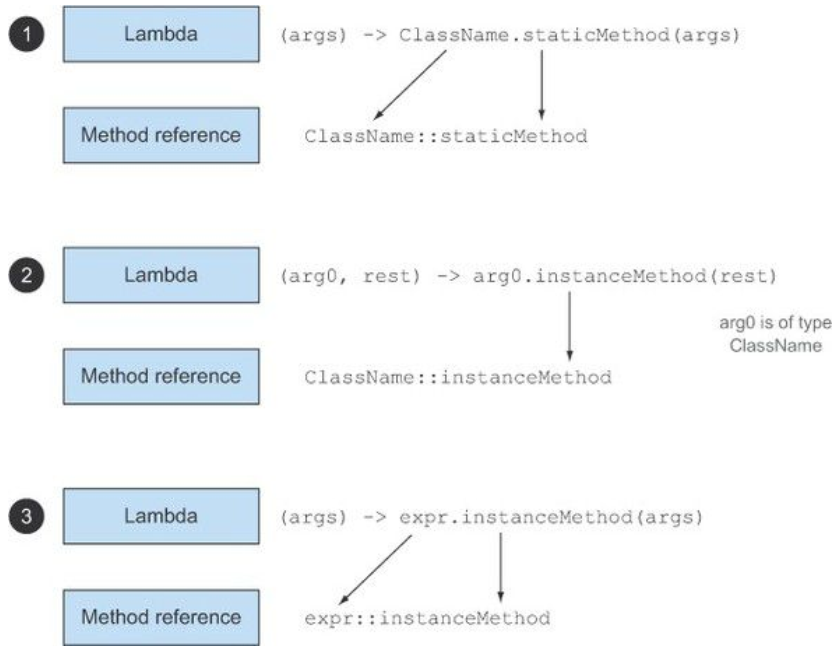
Recipe for constructing method references

There are three main kinds of method references:
  1. A method reference to a static method (for example, the method parseInt of Integer, written Integer::parseInt)
  2. A method reference to an instance method of an arbitrary type (for example, the method length of a String, written String::length)
  3. A method reference to an instance method of an existing object (for example, suppose you have a local variable expensiveTransaction that holds an object of type Transaction, which supports an instance method getValue; you can write expensiveTransaction::getValue)


Constructor references

You can create a reference to an existing constructor using its name and the keyword new as follows: ClassName::new.  It works similarly to a reference to a static method.
Examples (normally you would not use new on Strings or on Integer class!)

String s1 = new String();
Supplier<String> createNewString = String::new;
String s2 = createNewString.get();

Integer i1 = new Integer(12);
IntFunction<Integer> createNewInteger = Integer::new;
Integer i2 = createNewInteger.apply(12);


Lambdas in practice

Pear has weight property.

List<Pear> inventory = new ArrayList<>();
        inventory.addAll(Arrays.asList(new Pear(70), new Pear(135), new Pear(110)));
   
        // Use an anonymous class
        inventory.sort(new Comparator<Pear>() {
            public int compare(Pear p1, Pear p2){
                return p1.getWeight().compareTo(p2.getWeight());
        }});
   
        // Use lambda expressions
        inventory.sort((Pear p1, Pear p2) -> p1.getWeight().compareTo(p2.getWeight()));
   
        // Java compiler could infer the types of the parameters of a lambda expression by using the context in which the lambda appears
        inventory.sort((p1, p2) -> p1.getWeight().compareTo(p2.getWeight()));
   
        // Comparator has a static helper method called comparing that takes a Function extracting a Comparable key and produces a Comparator object
        inventory.sort(Comparator.comparing((a) -> a.getWeight()));
   
        // Use method references

        // import static java.util.Comparator.comparing;
        inventory.sort(comparing(Pear::getWeight));


        // chaining
        inventory.sort(comparing(Pear::getWeight).reversed());
        inventory.sort(comparing(Pear::getWeight).thenComparing(Pear::getCountry));

Ref:
Java 8 in Action book
Java 8: Behavior parameterization

Monday, December 15, 2014

Mockito notes

Mocking

Scenario:

In service class you want to mock dao call.
In service class make dao class package private (no modifier - optional).
Write test in same package (under test subfolder, not main).
Dao class has method called testingMockito(String someString);

Code example:

SomeService service; //injected
SomeDao dao = Mockito.mock(SomeDao.class);
service.setDao(dao); // or service.dao = dao;
//throw Exception when calling dao class
Mockito.doThrow(someException).when(dao).testingMockito(Mockito.anyString());

Verify

Mockito.verify(simCardServiceMock, Mockito.times(1)).findSimCard(simIdentifier);


Mock void methods:
1st service returns some response, 2nd service calls void method.

CustomerSearchService customerSearchService = Mockito.mock(CustomerSearchService.class);
Mockito.when(customerSearchService.searchSubscription(providerId, searchCriteria)).thenReturn(subscription);

final SubscriptionService subscriptionService = Mockito.mock(SubscriptionService.class);
Mockito.doNothing()
.when(subscriptionService)
.activateSubscription(providerId, subscription.getId());


Ref:
https://stackoverflow.com/questions/14889951/how-to-verify-a-method-is-called-two-times-with-mockito-verify
http://www.baeldung.com/mockito-behavior
https://stackoverflow.com/questions/2276271/how-to-make-mock-to-void-methods-with-mockito

Wednesday, November 27, 2013

Java .class version

javap - The Java Class File Disassembler


Usage


   javap -verbose YourClass

Output

  ...
  SourceFile: "YourClass.java"
  minor version: 0
  major version: 50
  flags: ACC_PUBLIC, ACC_SUPER
  ...

Major version

J2SE 7 = 51,
J2SE 6.0 = 50,
J2SE 5.0 = 49,
JDK 1.4 = 48,
JDK 1.3 = 47,
JDK 1.2 = 46,
JDK 1.1 = 45

Ref:
http://reverseengineering.stackexchange.com/questions/1328/find-out-a-java-class-files-compiler-version
http://docs.oracle.com/javase/7/docs/technotes/tools/windows/javap.html

Sunday, August 25, 2013

Javadoc tips

Referencing class: 

     {@link hr.samara.RadiusMessageResultEvent RadiusMessageResultEvent}

Referencing public static field: 

     {@link hr.samara.RadiusMessageResultEvent#EVENT_TYPE_ID EventType}

   * if class is within same package there is no need for naming package in link
     {@link RadiusMessageResultEvent}
   * second String is label

Ref:
http://docs.oracle.com/javase/7/docs/technotes/tools/windows/javadoc.html#link

Friday, July 26, 2013

Measuring time

How to measure time elapsed when invoking method or doing some processing.

long start = System.nanoTime();
sum_slow();
long end = System.nanoTime();
long diff = end - start;
System.out.println("Time: " + diff / 1000000000.0 + " seconds");
System.out.println("Time: " + TimeUnit.SECONDS.convert(diff, TimeUnit.NANOSECONDS) + " seconds");

Test:
Time: 18.596630883 seconds
Time: 18 seconds

Wednesday, July 24, 2013

Logging

log4j 1.2


Layouts:

#from mobicents-jainslee-2.7.0.FINAL-jboss-5.1.0.GA
%d{ABSOLUTE} %-5p [%c{1}] (%t) %m%n
21:47:59,146 WARN  [LogTest] (main) Sample warn message

%d [%t] %-5p %c - %m%n
2013-07-24 21:47:40,572 [main] WARN  org.mobicents.slee.test.LogTest - Sample warn message

# Pattern to output the caller's file name and line number.
%5p [%t] (%F:%L) - %m%n
 WARN [main] (LogTest.java:14) - Sample warn message

%d{ISO8601} [%t] %-5p (%F:%L) - %m%n 
 2013-07-24 21:55:03,407 [main] WARN  (LogTest.java:14) - Sample warn message

Appender's treshhold vs category

Treshhold is main filter, everything above Threshold value will go to appender. Then category can filter it further to priority's value.
In bellow example every logger in javax.slee.* package will be printed only if it is at least WARN level.

<appender name="CONSOLE" class="org.apache.log4j.ConsoleAppender">
<param name="Threshold" value="INFO"/>
...
</appender>

<category name="javax.slee">
<priority value="WARN" />
</category>


Ref:


Complete log4j.xml


<?xml version="1.0" encoding="UTF-8"?>

<!DOCTYPE log4j:configuration SYSTEM "log4j.dtd">


<log4j:configuration xmlns:log4j="http://jakarta.apache.org/log4j/"

debug="true">


<appender name="consoleAppender" class="org.apache.log4j.ConsoleAppender">
<param name="Threshold" value="debug" />
<layout class="org.apache.log4j.PatternLayout">
<param name="ConversionPattern" value="%d [%t] %-5p (%F:%L) - %m%n"/>
</layout>
</appender>

<category name="org.mobicents" additivity="false">
<level value="warn" />
<appender-ref ref="consoleAppender" />
</category>

</log4j:configuration>

Monday, May 6, 2013

Disk Helper


Utility class for saving, opening and zipping files.

public class DiskHelper
{

/**
* saveToDisk i openFile
*/
public static void printFileObject(FileObject fo)
{
File file = saveToDisk(fo, fo.getFilename());
openFile(file);
}

public static File saveToDisk(FileObject fo, String fileName)
{
String pdfSuffix = "";
if (!fileName.contains(".pdf"))
{
pdfSuffix = ".pdf";
}

File file = new File("c://tmp//" + fileName + pdfSuffix);

int i = 0;
while (file.exists())
{
i++;
file = new File("c://tmp//" + fileName.replace(".pdf", "") + "_" + i + ".pdf");
}

System.out.println("file.exists: " + file.exists());

OutputStream os;
try
{
os = new FileOutputStream(file);
os.write(fo.getContent());
os.flush();
os.close();
}
catch (FileNotFoundException e)
{
e.printStackTrace();
}
catch (IOException e)
{
e.printStackTrace();
}
return file;

}

public static void openFile(File file)
{
StringBuilder sb = new StringBuilder();
sb.append("cmd.exe /C start ");
sb.append(file.getAbsolutePath());
System.out.println("openFile: " + sb);
try
{
Runtime.getRuntime().exec(sb.toString());
}
catch (IOException e)
{
e.printStackTrace();
}
}

private static int byteValue = 1024;

/**
* http://www.mkyong.com/java/how-to-compress-files-in-zip-format/
*/
public static void zipFile(String fileName, File... files)
{
byte[] buffer = new byte[1024];

try
{
File zipfile = new File("C:\\tmp\\" + fileName + ".zip");
FileOutputStream fos = new FileOutputStream(zipfile);
ZipOutputStream zos = new ZipOutputStream(fos);

for (File file : files)
{
System.out.println("file.getName(): " + file.getName() + ", file.length(): " + file.length() / byteValue + " KB");
ZipEntry ze = new ZipEntry(file.getName());
zos.putNextEntry(ze);
FileInputStream in = new FileInputStream(file.getAbsoluteFile());
System.out.println("file.getAbsoluteFile(): " + file.getAbsoluteFile());

int len;
while ((len = in.read(buffer)) > 0)
{
zos.write(buffer, 0, len);
}

in.close();
}

System.out.println("zipfile.getName(): " + zipfile.getName() + ", zipfile.length(): " + zipfile.length() / byteValue + " KB");

zos.closeEntry();
zos.close();

System.out.println("Done");

}
catch (IOException ex)
{
ex.printStackTrace();
}
}

public static void deleteFiles(File... files)
{
for (File file : files)
{
file.delete();
}
}

}


public class FileObject
{
private String filename;
private byte[] content;

public byte[] getContent()
{
return content;
}

public void setContent(byte[] content)
{
this.content = content;
}

public String getFilename()
{
return filename;
}

public void setFilename(String filename)
{
this.filename = filename;
}

}

Thursday, March 14, 2013

Design patterns

Pattern - describes a solution to a common problem arising within a context by:
·       Naming a recurring design structure
·       Specifying design structure explicitly by identifying key class/object
·       Abstracting from concrete design elements, e.g., problem domain, form factor, vendor, etc.
·       Distilling & codifying knowledge gleaned by experts from their successful design experiences


Patterns:


  1. Builder
  2. Proxy
  3. Broker
  4. Command Processor
  5. Observer
  6. Layered Architecture
  7. Strategy
  8. Abstract Factory
  9. Wrapper Facade
  10. Reactor
  11. Acceptor-Connector
  12. Template Method Pattern


Ref:
The 23 Gang of Four Design Patterns .. Revisited
Pattern-Oriented Software Architectures for Concurrent and Networked Software
https://dzone.com/articles/java-design-pattern-simplified-part-1-of-django-se


Builder

is GoF Object Creational pattern.
Separate the construction of a complex object from its representation so that the same construction process can create different representations. 


Ref:
http://java.dzone.com/news/design-pattern-builder-pattern
https://en.wikipedia.org/wiki/Builder_pattern


http://java.dzone.com/articles/intro-design-patterns-prototype


Proxy

is GoF Object Structural pattern.
Intent: Provide a surrogate or placeholder for another object to control access to it
Applicability: Proxies are useful wherever there is a need for a more sophisticated reference to a object than a simple pointer or simple reference can provide
Structure

Dynamics

Consequences
+ Decoupling client from object location
+ Simplify tedious & error-prone details
- Additional overhead from indirection
- May impose overly restrictive type system
- It’s not possible to entirely shield clients from networking & IPC


Broker

is POSA1 Architectural Pattern.
IntentConnect clients with remote objects by mediating invocations from clients to remote objects, while encapsulating the details of IPC or network communication
ApplicabilityApps need capabilities to support (potentially) remote communication, provide location transparency, handle faults, manage end-to-end QoS, & encapsulate low-level system details
Dynamics


Consequences
+ Location independence
+ Separation of concerns
+ Portability, modularity, reusability, etc.
- Additional time & space overhead
- May complicate debugging & testing


Command Processor

is POSA1 Design Pattern (it is similar to Command pattern in GoF book).
Intent: Encapsulate the request for a service as a command object
Applicability:
• Specify, queue, & execute service requests at different times
• Ensure service enhancements don’t break existing code
• Implement additional capabilities (such as undo/redo & persistence) consistently for all requests to a service
Structure & Dynamics

Consequences
+ Allow different users to work with service in different ways via commands
+ Client isn’t blocked for duration of command processing
– Additional programming to handle info passed with commands (cf. Broker)
– Supporting two-way operations requires additional patterns

The Command Processor pattern provides a relatively straightforward means for passing commands asynchronously between threads and/or processes in concurrent & networked software
In contrast, many implementations of Broker use synchronous (blocking) method invocations (Some brokers also support asynchronous method invocations)


Observer

is GoF Object Behavioral pattern (POSA1 book contains description of similar Publisher-Subscriber pattern)
Intent: Define a one-to-many dependency between objects so that when one object changes state, all dependents are notified & updated
Applicability:
• An abstraction has two aspects, one dependent on the other
• A change to one object requires changing untold others
• An object should notify unknown other objects
Structure 
Dynamics
Consequences
+ Modularity: subject & observers may vary independently
+ Extensibility: can define/add any # of observers
+ Customizability: different observers offer different views of subject
– Unexpected updates: observers don’t know about each other
– Update overhead: too many irrelevant updates


Layered Architecture

is POSA1 Design Pattern.

The Layered architectural pattern helps to structure applications that can be decomposed into groups of subtasks in which each group of subtasks Is at a particular level of abstraction.


Ref: http://posa1.blogspot.com/2008/05/layered-architecture-pattern.html


Strategy

(also known as the policy pattern) is a software design pattern, whereby an algorithm's behaviour can be selected at runtime. Formally speaking, the strategy pattern defines a family of algorithms, encapsulates each one, and makes them interchangeable. Strategy lets the algorithm vary independently from clients that use it.

You can apply this pattern to a multitude of scenarios, such as validating an input with different criteria, using different ways of parsing, or formatting an input.
The strategy pattern consists of three parts:

  1. An interface to represent some algorithm (the interface Strategy)
  2. One or more concrete implementations of that interface to represent multiple algorithms (the concrete classes ConcreteStrategyA and ConcreteStrategyB)
  3. One or more clients that use the strategy objects

Ref: https://en.wikipedia.org/wiki/Strategy_pattern


Abstract Factory

provides a way to encapsulate a group of individual factories that have a common theme without specifying their concrete classes. In normal usage, the client software creates a concrete implementation of the abstract factory and then uses the generic interfaces to create the concrete objects that are part of the theme. The client does not know (or care) which concrete objects it gets from each of these internal factories, since it uses only the generic interfaces of their products. This pattern separates the details of implementation of a set of objects from their general usage and relies on object composition, as object creation is implemented in methods exposed in the factory interface.

Ref: https://en.wikipedia.org/wiki/Abstract_factory_pattern


Wrapper Facade

is POSA 2 pattern - A Structural Pattern for Encapsulating Functions within Classes
Intent: Encapsulate low-level functions and data structures within more concise, robust, portable, and maintainable higher-level object-oriented class interfaces.


Benefits
Concise & robust higher-level OO programming interfaces
• Reduce the tedium & increase the type-safety of developing apps, which decreases certain types of accidental complexities
Portability & maintainability
• Shield app developers from non-portable aspects of lower-level APIs
Modularity, reusability, & configurability
• Creates cohesive & reusable class components that can be ‘plugged’ into other components in a wholesale fashion
• e.g., using OO language features like inheritance & parameterized types

Limitations
Loss of functionality
• Whenever a portable abstraction is layered on top of an existing API it’s possible to lose functionality
Performance degradation
• Performance can degrade if many forwarding function calls and/or indirections are made per wrapper façade method
Programming language & compiler limitations
• May be hard to define wrapper facades for certain languages due to a lack of language support or limitations with compilers


Known usages:
The Java Virtual Machine (JVM) and various Java foundation class libraries, such as AWT and Swing, provide a set of wrapper facades that encapsulate most of the lowlevel native OS system calls and GUI APIs.

Ref: https://en.wikipedia.org/wiki/Facade_pattern
       http://www.cs.wustl.edu/~schmidt/PDF/wrapper-facade.pdf


Reactor

-An Object Behavioral Pattern for Demultiplexing and Dispatching Handles for Synchronous Events
Intent: The Reactor design pattern handles service requests that are delivered concurrently to an application by one or more clients. Each service in an application may consist of serveral methods and is represented by a separate event handler that is responsible for dispatching service-specific requests. Dispatching of event handlers is performed by an initiation dispatcher, which manages the registered event handlers. Demultiplexing of service requests is performed by a synchronous event demultiplexer.


Acceptor-Connector

-An Object Creational Pattern for Connecting and Initializing Communication Services
Intent: The Acceptor-Connector design pattern decouples connection establishment and service initialization in a distributed system from the processing performed once a service is initialized. This decoupling is achieved with three components: acceptors, connectors, and service handlers. A connector actively establishes a connection with a remote acceptor component and initializes a service handler to process data exchanged on the connection. Likewise, an acceptor passively waits for connection requests from remote connectors, establishing a connection upon arrival of such a request, and initializing a service handler to process data exchanged on the connection. The initialized service handlers then perform application-specific processing and communicate via the connection established by the connector and acceptor components.

Template Method Pattern

The template method design pattern is a common solution when you need to represent the outline of an algorithm and have the additional flexibility to change certain parts of it. In other words, the template method pattern is useful when you ind yourself in a situation such as "I’d love to use this algorithm but I need to change a few lines so it does what I want."

A Template Method Pattern contains a method that provides the steps of the algorithm. It allows subclasses to override some of the methods.

Monday, June 18, 2012

CRON expressions


import java.text.ParseException;
import java.util.Date;
import org.quartz.CronExpression;

public class CronTester {
 public static void main(String[] args) throws ParseException {
  final String expression = "0 0/30 01-06 * * ?";
  final CronExpression cronExpression = new CronExpression(expression);
  Date date = new Date();
  for (int i = 0; i < 20; i++) {
   date = cronExpression.getNextValidTimeAfter(date);
   System.out.println(date);
  }
 }
}

http://en.wikipedia.org/wiki/Cron
http://www.cronmaker.com/

Tuesday, April 24, 2012

PECS - wildcards - generics

PECS - Pruducer extends, Consumer super

Only applies to input parameters.
Do not use wildcard type for return value - doesn't make it more flexible!

List<String> is a subtype of List<? extends Object>
List<Object> is a subtype of List<? super String>

eg.
pushAll(Collection<? extends E> src);
 - src is an E producer; you can push Long to Collection<Number>
popAll(Collection<? super E> dst);
 - dst is an E consumer; you can pop Numbers to Collection<Object>

Both produces and consumes use T.
Neither produces or consumes use ?.

Monday, April 23, 2012

ResourceBundle

I need to read messages_hr.properties file that is in the classpath of web project.

1) Load properties file: 
ResourceBundle bridgeMsgBundle = ResourceBundle.getBundle("messages", new Locale("hr"));

2) Fomat text with parameters:
String text = MessageFormat.format(bridgeMsgBundle.getString("javax.faces.validator.LengthValidator.MAXIMUM"), 15);

In messages_hr.properties: 
javax.faces.validator.LengthValidator.MAXIMUM=* Maksimalan broj znakova je {0}.

Wednesday, January 11, 2012

Sort by 2 properties

There is list of articles that needs to be sorted by zone and then by name

List<Article> listaArtikala = articleManager.findByFilter(filter);
// sortiraj artikle po zoni
Collections.sort(listaArtikala, new Comparator<Article>()
{
@Override
public int compare(Article o1, Article o2)
{
return o1.getZone().getMark().compareTo(o2.getZone().getMark());
}
});

// razdvoji po zoni aktikle
Map<String, List<Article>> map = new TreeMap<String, List<Article>>();
for (Article a : listaArtikala)
{
String mark = a.getZone().getMark();
List<Article> tempList = map.get(mark);
if (tempList == null)
{
tempList = new ArrayList<Article>();
map.put(mark, tempList);
}
tempList.add(a);
}
listaArtikala.clear();

// sortiraj po imenu artikla
for (String mark : map.keySet())
{
List<Article> tempList = map.get(mark);
Collections.sort(tempList, new Comparator<Article>()
{
@Override
public int compare(Article o1, Article o2)
{
return o1.getName().compareTo(o2.getName());
}
});
listaArtikala.addAll(tempList);
}

Thursday, January 5, 2012

Reading Active Directory


Example of reading users e-mail address from AD:

public static void main(String[] args)
{
Hashtable env = new Hashtable(11);
env.put(Context.SECURITY_PRINCIPAL, "userName (CN)");
env.put(Context.SECURITY_CREDENTIALS, "pass");
env.put(Context.INITIAL_CONTEXT_FACTORY, "com.sun.jndi.ldap.LdapCtxFactory");
env.put(Context.PROVIDER_URL, "ldap://serverName:389/DC=domain1,DC=hr");

String users = "ou=Unit,ou=Organizational";
try
{
DirContext ctx = new InitialDirContext(env);

Attributes answer = null;
String[] attrIDs = { "mail" };//Specify the ids of the attributes to return
NamingEnumeration list = ctx.list(users);
while (list.hasMore())
{
NameClassPair nc = (NameClassPair) list.next();
System.out.println(nc.getName());
answer = ctx.getAttributes(nc.getName() + " , " + users, attrIDs);
for (NamingEnumeration ae = answer.getAll(); ae.hasMore();)
{
Attribute attr = (Attribute) ae.next();
System.out.println("attribute: " + attr.getID());
/* Print each value */
for (NamingEnumeration e = attr.getAll(); e.hasMore(); System.out.println(e.next()))
;
}
}
}
catch (NamingException e)
{
System.err.println(e);
}
}


Resources:
http://www.windowsnetworking.com/kbase/WindowsTips/Windows2000/AdminTips/ActiveDirectory/ActiveDirectoryNamingStandard.html
http://docs.oracle.com/javase/tutorial/jndi/ops/getattrs.html

Tuesday, December 13, 2011

Eclipse preferences

  1. Hot deploy on Tomcat - when you make changes to class it should be asap visible in Tomcat (JRebel would like that :)
    • Create Launch Configuration under Tomcat - Launch (Preferences), Debug is checked
    • This is working only on web project, not projects included in it
  2. General - check Show heap status
  3. General - Workspace - set Text file encoding
  4. General - Editors- Text Editors - Show line nubers
  5. Run/Debug - Console - uncheck Limit console output
  6. modify start shortcut: 
    • "C:\MyEclipse\myeclipseforspring.exe" -data D:\Workspace\Play -vmargs -Xmx768m -XX:MaxPermSize=384m -XX:ReservedCodeCacheSize=64m
  7. add latest Subclipse
  8. add bin and target folders to global svn ignore list
    • Windows - Preferences - Team - Ignored Resources - Add Pattern
    • enter bin then target then m2-target
  9. remove antivirus scan from workspace and eclipse installation directory
  10. add -showlocation as first line in eclipse.ini to show workspace location in title bar
Find resource in specific folder?
Open resource (Ctrl + Shift + R) - find start.jsp in msgbox subfolder:
*/msgbox/start.jsp

How to tell eclipse where is my java located?
Edit eclipse.ini file add line before -vmargs:
-vm (new line needed :)
C:\Java\jdk1.6.0\jre\bin\javaw.exe

How to change @author default field in Javadoc?
Edit eclipse.ini file, add line
-Duser.name=My name

Missing deployment assembly even if Dynamic Web Module is added as project facet
Add
 <nature>org.eclipse.wst.common.modulecore.ModuleCoreNature</nature>
to your .project file.

Quick Search
CTRL+SHIFT+L
https://marketplace.eclipse.org/content/quick-search-eclipse
https://spring.io/blog/2013/07/11/eclipse-quick-search/

Add decompiler
http://jadclipse.sourceforge.net/wiki/index.php/Main_Page
http://www.mkyong.com/java/java-decompiler-plugin-for-eclipse/

Ref:
http://wiki.eclipse.org/Eclipse.ini
What are the best JVM settings for Eclipse?
https://dzone.com/articles/show-workspace-location-title


TOMCAT - JVM parameters:
-Xms256m -Xmx1024m 
-XX:PermSize=64m -XX:MaxPermSize=512m
-Dorg.apache.el.parser.COERCE_TO_ZERO=false
-Dsun.jnu.encoding=UTF-8 
-Dfile.encoding=UTF-8


JVM params explained

-Xms<size>              set initial Java heap size
-Xmx<size>              set maximum Java heap size
-XX:PermSize<size>  set initial PermGen Size
-XX:MaxPermSize<size>  set the maximum PermGen Size
https://www.mkyong.com/java/find-out-your-java-heap-memory-size/

Friday, August 26, 2011

Open file with default program

In my example I have pdf file that I want to be opened as soon as it is saved to disk.


public static void openFile(File fileObj)
{
    StringBuilder sb = new StringBuilder();
    sb.append("cmd.exe /C start ");
    sb.append(fileObj.getAbsolutePath());
    System.out.println("openFile: " + sb);
    try
    {
        Runtime.getRuntime().exec(sb.toString());
    }
    catch (IOException e)
    {
        System.out.println("EEExxxccc");
    }
    }