Thursday, March 14, 2013

Design patterns

Pattern - describes a solution to a common problem arising within a context by:
·       Naming a recurring design structure
·       Specifying design structure explicitly by identifying key class/object
·       Abstracting from concrete design elements, e.g., problem domain, form factor, vendor, etc.
·       Distilling & codifying knowledge gleaned by experts from their successful design experiences


Patterns:


  1. Builder
  2. Proxy
  3. Broker
  4. Command Processor
  5. Observer
  6. Layered Architecture
  7. Strategy
  8. Abstract Factory
  9. Wrapper Facade
  10. Reactor
  11. Acceptor-Connector
  12. Template Method Pattern


Ref:
The 23 Gang of Four Design Patterns .. Revisited
Pattern-Oriented Software Architectures for Concurrent and Networked Software
https://dzone.com/articles/java-design-pattern-simplified-part-1-of-django-se


Builder

is GoF Object Creational pattern.
Separate the construction of a complex object from its representation so that the same construction process can create different representations. 


Ref:
http://java.dzone.com/news/design-pattern-builder-pattern
https://en.wikipedia.org/wiki/Builder_pattern


http://java.dzone.com/articles/intro-design-patterns-prototype


Proxy

is GoF Object Structural pattern.
Intent: Provide a surrogate or placeholder for another object to control access to it
Applicability: Proxies are useful wherever there is a need for a more sophisticated reference to a object than a simple pointer or simple reference can provide
Structure

Dynamics

Consequences
+ Decoupling client from object location
+ Simplify tedious & error-prone details
- Additional overhead from indirection
- May impose overly restrictive type system
- It’s not possible to entirely shield clients from networking & IPC


Broker

is POSA1 Architectural Pattern.
Intent: Connect clients with remote objects by mediating invocations from clients to remote objects, while encapsulating the details of IPC or network communication
Applicability: Apps need capabilities to support (potentially) remote communication, provide location transparency, handle faults, manage end-to-end QoS, & encapsulate low-level system details
Dynamics


Consequences
+ Location independence
+ Separation of concerns
+ Portability, modularity, reusability, etc.
- Additional time & space overhead
- May complicate debugging & testing


Command Processor

is POSA1 Design Pattern (it is similar to Command pattern in GoF book).
Intent: Encapsulate the request for a service as a command object
Applicability:
• Specify, queue, & execute service requests at different times
• Ensure service enhancements don’t break existing code
• Implement additional capabilities (such as undo/redo & persistence) consistently for all requests to a service
Structure & Dynamics

Consequences
+ Allow different users to work with service in different ways via commands
+ Client isn’t blocked for duration of command processing
– Additional programming to handle info passed with commands (cf. Broker)
– Supporting two-way operations requires additional patterns

The Command Processor pattern provides a relatively straightforward means for passing commands asynchronously between threads and/or processes in concurrent & networked software
In contrast, many implementations of Broker use synchronous (blocking) method invocations (Some brokers also support asynchronous method invocations)


Observer

is GoF Object Behavioral pattern (POSA1 book contains description of similar Publisher-Subscriber pattern)
Intent: Define a one-to-many dependency between objects so that when one object changes state, all dependents are notified & updated
Applicability:
• An abstraction has two aspects, one dependent on the other
• A change to one object requires changing untold others
• An object should notify unknown other objects
Structure 
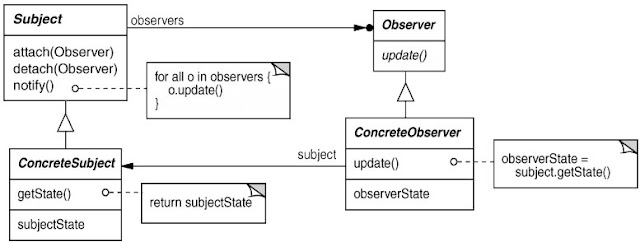
Dynamics
Consequences
+ Modularity: subject & observers may vary independently
+ Extensibility: can define/add any # of observers
+ Customizability: different observers offer different views of subject
– Unexpected updates: observers don’t know about each other
– Update overhead: too many irrelevant updates


Layered Architecture

is POSA1 Design Pattern.

The Layered architectural pattern helps to structure applications that can be decomposed into groups of subtasks in which each group of subtasks Is at a particular level of abstraction.


Ref: http://posa1.blogspot.com/2008/05/layered-architecture-pattern.html


Strategy

(also known as the policy pattern) is a software design pattern, whereby an algorithm's behaviour can be selected at runtime. Formally speaking, the strategy pattern defines a family of algorithms, encapsulates each one, and makes them interchangeable. Strategy lets the algorithm vary independently from clients that use it.

You can apply this pattern to a multitude of scenarios, such as validating an input with different criteria, using different ways of parsing, or formatting an input.
The strategy pattern consists of three parts:

  1. An interface to represent some algorithm (the interface Strategy)
  2. One or more concrete implementations of that interface to represent multiple algorithms (the concrete classes ConcreteStrategyA and ConcreteStrategyB)
  3. One or more clients that use the strategy objects

Ref: https://en.wikipedia.org/wiki/Strategy_pattern


Abstract Factory

provides a way to encapsulate a group of individual factories that have a common theme without specifying their concrete classes. In normal usage, the client software creates a concrete implementation of the abstract factory and then uses the generic interfaces to create the concrete objects that are part of the theme. The client does not know (or care) which concrete objects it gets from each of these internal factories, since it uses only the generic interfaces of their products. This pattern separates the details of implementation of a set of objects from their general usage and relies on object composition, as object creation is implemented in methods exposed in the factory interface.

Ref: https://en.wikipedia.org/wiki/Abstract_factory_pattern


Wrapper Facade

is POSA 2 pattern - A Structural Pattern for Encapsulating Functions within Classes
Intent: Encapsulate low-level functions and data structures within more concise, robust, portable, and maintainable higher-level object-oriented class interfaces.


Benefits
Concise & robust higher-level OO programming interfaces
• Reduce the tedium & increase the type-safety of developing apps, which decreases certain types of accidental complexities
Portability & maintainability
• Shield app developers from non-portable aspects of lower-level APIs
Modularity, reusability, & configurability
• Creates cohesive & reusable class components that can be ‘plugged’ into other components in a wholesale fashion
• e.g., using OO language features like inheritance & parameterized types

Limitations
Loss of functionality
• Whenever a portable abstraction is layered on top of an existing API it’s possible to lose functionality
Performance degradation
• Performance can degrade if many forwarding function calls and/or indirections are made per wrapper façade method
Programming language & compiler limitations
• May be hard to define wrapper facades for certain languages due to a lack of language support or limitations with compilers


Known usages:
The Java Virtual Machine (JVM) and various Java foundation class libraries, such as AWT and Swing, provide a set of wrapper facades that encapsulate most of the lowlevel native OS system calls and GUI APIs.

Ref: https://en.wikipedia.org/wiki/Facade_pattern
       http://www.cs.wustl.edu/~schmidt/PDF/wrapper-facade.pdf


Reactor

-An Object Behavioral Pattern for Demultiplexing and Dispatching Handles for Synchronous Events
Intent: The Reactor design pattern handles service requests that are delivered concurrently to an application by one or more clients. Each service in an application may consist of serveral methods and is represented by a separate event handler that is responsible for dispatching service-specific requests. Dispatching of event handlers is performed by an initiation dispatcher, which manages the registered event handlers. Demultiplexing of service requests is performed by a synchronous event demultiplexer.


Acceptor-Connector

-An Object Creational Pattern for Connecting and Initializing Communication Services
Intent: The Acceptor-Connector design pattern decouples connection establishment and service initialization in a distributed system from the processing performed once a service is initialized. This decoupling is achieved with three components: acceptors, connectors, and service handlers. A connector actively establishes a connection with a remote acceptor component and initializes a service handler to process data exchanged on the connection. Likewise, an acceptor passively waits for connection requests from remote connectors, establishing a connection upon arrival of such a request, and initializing a service handler to process data exchanged on the connection. The initialized service handlers then perform application-specific processing and communicate via the connection established by the connector and acceptor components.

Template Method Pattern

The template method design pattern is a common solution when you need to represent the outline of an algorithm and have the additional flexibility to change certain parts of it. In other words, the template method pattern is useful when you ind yourself in a situation such as "I’d love to use this algorithm but I need to change a few lines so it does what I want."

A Template Method Pattern contains a method that provides the steps of the algorithm. It allows subclasses to override some of the methods.

Tuesday, February 5, 2013

Custom Converters

To make custom converter I found 4 ways of doing it:
  1. using Map in Bean object
  2. parsing Object to String
  3. using static Map
  4. defining inner class in backing bean

Using Map in Bean

In Bean class you need to have Map<key, Object>.
In converters getAsObject method you read object value from this map.

public Object getAsObject(FacesContext context, UIComponent component, String value) throws ConverterException
{
if (context == null) throw new NullPointerException("context");
if (component == null) throw new NullPointerException("component");
if (value == null || value.isEmpty()) return null;
// value je oid recorda

FacesContext ctx = FacesContext.getCurrentInstance();
ValueExpression vex = ctx.getApplication().getExpressionFactory().createValueExpression(ctx.getELContext(), "#{billViewBean}", BillViewBean.class);
BillViewBean view = (BillViewBean) vex.getValue(ctx.getELContext());

TowRecord record;
record = view.getRecordsMap().get(value);
if (record == null)
{

FacesMessage message = new FacesMessage(FacesMessage.SEVERITY_ERROR, "Unknown value", "The record is unknown!");
throw new ConverterException(message);
}

return record;
}


public String getAsString(FacesContext context, UIComponent component, Object value) throws ConverterException
{
if (context == null) throw new NullPointerException("context");
if (component == null) throw new NullPointerException("component");
if (value == null) return null;
if (!(value instanceof TowRecord))
{
log.error("Error converting TowRecord to String: Object is not an instance of TowRecord.");
throw new ConverterException("Object is not an instance of TowRecord.");
}

TowRecord record = (TowRecord) value;
return record.getOid();
}
    Ref: JSF 2.0 Cookbook: Using custom converters for h:selectOneMenu


Parsing Object to String

If using this approach you could be in problems with JPA.
Also if object if composed with many minor objects it can be heavy to parse to and from object.

public Object getAsObject(FacesContext context, UIComponent component, String value) throws ConverterException
{
if (value == null || value.isEmpty()) return null;

String[] attributes = StringUtils.delimitedListToStringArray(value, DELIMITER);

TowRecord record = new TowRecord(attributes[0], attributes[1], attributes[2]);
log.debug("Converter to object: " + record.getOid() + ", " + record.getNumber() + ", " + record.getRegistration().getLicensePlate());
return record;
}

public String getAsString(FacesContext context, UIComponent component, Object value) throws ConverterException
{
if (value == null)
return null;
else if (!(value instanceof TowRecord))
{
log.error("Error converting TowRecord to String: Object is not an instance of TowRecord.");
throw new ConverterException("Object is not an instance of TowRecord.");
}
else
{
TowRecord record = (TowRecord) value;
String recordString = record.getOid() + DELIMITER + record.getNumber() + DELIMITER + record.getRegistration().getLicensePlate();

log.debug("Converted record to String " + recordString);
return recordString;
}
}

   Ref: Core JavaServer Faces  3rd Edition: Implementing Custom Converter Classes


Using static Map

You create class that will hold static maps, and from converter class you can easily access it.
Drawback is that you need to be careful how many object you can put in map.. memory issue.

public class MapHolder

{
private static Map<String, AbstractDOM> recordsMap = Collections.synchronizedMap(new HashMap<String, AbstractDOM>());

public static Map<String, AbstractDOM> getRecordsMap()
{
return recordsMap;
}
}

public class TowRecordsSTATICConverter implements Converter :
public Object getAsObject(FacesContext context, UIComponent component, String value) throws ConverterException
{
if (value == null || value.isEmpty()) return null;

return MapHolder.getRecordsMap().get(value);
}

public String getAsString(FacesContext context, UIComponent component, Object value) throws ConverterException
{
if (value == null)
return null;
else if (!(value instanceof TowRecord))
{
log.error("Error converting TowRecord to String: Object is not an instance of TowRecord.");
throw new ConverterException("Object is not an instance of TowRecord.");
}
else
{
TowRecord record = (TowRecord) value;
return record.getOid();
}
}


Inner class in backing bean

using this approach you have access to Collection defined and populated in backing bean.

In this example you define:
private List<ReasonDPT> reasonList = new ArrayList<ReasonDPT>();
In xhtml you register converter as converter="#{backingBean.reasonDPTConverter}"

private class ReasonDPTConverter implements Converter
{

@Override
public Object getAsObject(FacesContext context, UIComponent component, String value)
{
for (ReasonDPT o : reasonList)
{
if (o.getOid().equals(value)) return o;
}
return null;
}

@Override
public String getAsString(FacesContext context, UIComponent component, Object value)
{
if (value == null) { return ""; }
return ((ReasonDPT) value).getOid();
}
}

Wednesday, January 23, 2013

DataTable -Multiple checkbox selection with ajax

Problem

You need to select few rows and then hit button to continue with logic. (using checkbox)
Button should be disabled if no entry is selected. (Ajax events)
When you press button you get popup window (dialog) that displays selected entries.

Solution


<h:form id="detailsForm">
<p:dialog id="detailsDlg" widgetVar="details" modal="true" resizable="false" width="900">

  <p:dataTable id="recordsTable" value="#{activeBackingBean.recordsDataModel}"
var="rec" selection="#{activeBackingBean.selectedRecords}"
  scrollable="#{activeBackingBean.recordsDataModel.rowCount gt 7 ? true : false}"
scrollHeight="200" scrollWidth="750"
  resizableColumns="false" >

<p:column selectionMode="multiple" width="35"/>

<p:ajax update="viewSelectedRecButton" event="toggleSelect" 
listener="#{activeBackingBean.recordsRowSelected}"/>
<p:ajax update="viewSelectedRecButton" event="rowSelectCheckbox"
listener="#{activeBackingBean.recordsRowSelected}"/>
<p:ajax update="viewSelectedRecButton" event="rowUnselectCheckbox"
listener="#{activeBackingBean.recordsRowSelected}"/>

<p:column headerText="Broj" width="200">
    #{rec.number}
    </p:column>

  <p:column headerText="Registracija" width="420">
    #{rec.registration.formatted}
    </p:column>

    <f:facet name="footer">
        <p:commandButton id="viewSelectedRecButton" value="SomeAction"
icon="ui-icon-search"
                               disabled="#{empty activeBackingBean.selectedRecords}"
               update=":detailsForm:displayMultiRec"
                              oncomplete="multiRecDialog.show();"/>
       </f:facet>  
        </p:dataTable>
    </p:dialog>


   <p:dialog id="multiDialog" header="Odabrani zapisnici" widgetVar="multiRecDialog"
          height="300" showEffect="fade" hideEffect="explode">
       <p:dataList id="displayMultiRec"
            value="#{activeBackingBean.selectedRecords}" var="selectedRecord">
        Broj: #{selectedRecord.number}, Rega: #{selectedRecord.registration.formatted}
      </p:dataList>
   </p:dialog>


Listener on ajax event is optional.

BackingBean:

private TowRecord[] selectedRecords;
private RecordsDataModel recordsDataModel;
public void recordsRowSelected(AjaxBehaviorEvent e)

public class RecordsDataModel extends ListDataModel<TowRecord> implements SelectableDataModel<TowRecord>

ajax events:
toggleSelect - toogle/untoggle all

References

http://www.primefaces.org/showcase/ui/datatableRowSelectionRadioCheckbox.jsf
http://stackoverflow.com/questions/12677924/primefaces-datatable-ajax-not-updating-any-component-except-itself


Monday, December 10, 2012

Oracle XE


Change HTTP port

Default port is 8080!
start Run SQL Command Line
connect as sysdba
begin
dbms_xdb.sethttpport('80');
end;
/
select dbms_xdb.gethttpport from dual;
shutdown immediate;
startup


http://daust.blogspot.com/2006/01/xe-changing-default-http-port.html

Wednesday, November 7, 2012

Port forwarding /tunneling


From wiki

Port forwarding or port mapping is a name given to the combined technique of:
  1. translating the address and/or port number of a packet to a new destination 
  2. possibly accepting such packet(s) in a packet filter (firewall)
  3. forwarding the packet according to the routing table.

The destination may be a predetermined network port (assuming protocols like TCP and UDP, though the process is not limited to these) on a host within a NAT-masqueraded, typically private network, based on the port number on which it was received at the gateway from the originating host.
The technique is used to permit communications by external hosts with services provided within a private local area network.

Examples

Windows server
Kad dodje komunikacija prema 213.186.16.227:1433 preusmjeri to na 192.168.7.27:1433
netsh interface portproxy add v4tov4 
listenport=1433 listenaddress=213.186.16.227 
connectport=1433 connectaddress=192.168.7.27

Display all port forwards::
netsh interface portproxy show all

Delete:
netsh interface portproxy delete v4tov4 
listenport=1433 listenaddress=213.186.16.227 

For putty tunneling:
http://www.codemastershawn.com/library/tutorial/ssh.tunnel.php

Friday, September 21, 2012

Spring web security


in web.xml:

Define the filter and filter-mapping for Spring Security (single proxy filter):
<filter>
           <filter-name>springSecurityFilterChain</filter-name>
           <filter-class>org.springframework.web.filter.DelegatingFilterProxy</filter-class>
</filter>
<filter-mapping>
          <filter-name>springSecurityFilterChain</filter-name>
          <url-pattern>/*</url-pattern>
 </filter-mapping>

in the Application Context:

- using security namespace
<security:http access-denied-page="/denied.jsp" use-expressions="true">
<security:form-login login-page="/login.jsp"
authentication-failure-url="/login.jsp?login_error=true" />
<security:intercept-url pattern="/accounts/edit*" access="hasRole('ROLE_EDITOR')" />
<security:intercept-url pattern="/accounts/account*" access="hasAnyRole('ROLE_VIEWER','ROLE_EDITOR')" />
<security:intercept-url pattern="/accounts/**" access="isAuthenticated()" />
<security:logout/>
</security:http>

intercept-url are evaluated in the order listed (the first match will be used; specific matches should be put on top).
access-denied-page - user is logged in but it does not have appropriate role.
security:logout - Incorporates a logout processing filter.

<security:authentication-manager>  --configure authentication
<security:authentication-provider>
<security:password-encoder hash="md5" >
<security:salt-source system-wide="MySalt" or user-property=“id“ />
</security:password-encoder>
<security:user-service properties="/WEB-INF/users.properties" />
or use jdbc or ldap -user-service
<security:jdbc-user-service data-source-ref="dataSource"/>
</security:authentication-provider>
</security:authentication-manager>

Thursday, September 20, 2012

Spring best practices


  • DO NOT use version numbers with the Spring schema namespaces
  • Always use classpath:/ prefix for consist resource referencing
  • Always use a single XML config file to bootstrap the application or tests
  • Use the XML “id” attribute to identify a bean
  • Use Constructor injection to promote thread safety
  • Use Properties for configurable resources


Monday, September 17, 2012

Oracle functions

System functions

SYS_GUID()

SYS_GUID generates and returns a globally unique identifier (RAW value) made up of 16 bytes. On most platforms, the generated identifier consists of a host identifier, a process or thread identifier of the process or thread invoking the function, and a nonrepeating value (sequence of bytes) for that process or thread.

Ref: http://www.stanford.edu/dept/itss/docs/oracle/10g/server.101/b10759/functions153.htm

SYSDATE

SYSDATE returns the current date and time set for the operating system on which the database resides.

Ref: http://docs.oracle.com/cd/B19306_01/server.102/b14200/functions172.htm

Example:

insert into TABLE2 (oid, created) VALUES(sys_guid(), sysdate)

To_Date function

In Oracle/PLSQL, the to_date function converts a string to a date.
The syntax for the to_date function is:

to_date( string1, [ format_mask ], [ nls_language ] )

string1 is the string that will be converted to a date.
format_mask is optional. This is the format that will be used to convert string1 to a date.
nls_language is optional. This is the nls language used to convert string1 to a date.

Example:
to_date('1.9.2012','dd.mm.yyyy')
to_date('1.9.2012 23:59:59','dd.mm.yyyy HH24:mi:ss')

Between condition

The BETWEEN operator selects a range of data between two values. The values can be numbers, text, or dates

SELECT *
FROM orders
WHERE order_date between to_date ('2003/01/01', 'yyyy/mm/dd')
AND to_date ('2003/12/31', 'yyyy/mm/dd');

is equal to 

WHERE order_date >= to_date('2003/01/01', 'yyyy/mm/dd')
AND order_date <= to_date('2003/12/31','yyyy/mm/dd');

Decode function

In Oracle/PLSQL, the decode function has the functionality of an IF-THEN-ELSE statement.
The syntax for the decode function is:

decode( expression , search , result [, search , result]... [, default] )

expression is the value to compare.
search is the value that is compared against expression.
result is the value returned, if expression is equal to search.
default is optional. If no matches are found, the decode will return default. If default is omitted, then the decode statement will return null (if no matches are found).

For Example:
You could use the decode function in an SQL statement as follows:

SELECT supplier_name,
decode(supplier_id, 10000, 'IBM',
10001, 'Microsoft',
10002, 'Hewlett Packard',
'Gateway') result
FROM suppliers;

The above decode statement is equivalent to the following IF-THEN-ELSE statement:

IF supplier_id = 10000 THEN
     result := 'IBM';
ELSIF supplier_id = 10001 THEN
    result := 'Microsoft';
ELSIF supplier_id = 10002 THEN
    result := 'Hewlett Packard';
ELSE
    result := 'Gateway';
END IF;

The decode function will compare each supplier_id value, one by one.
http://www.techonthenet.com/oracle/functions/decode.php

NVL Function

In Oracle/PLSQL, the NVL function lets you substitute a value when a null value is encountered.
The syntax for the NVL function is:

nvl( string1, replace_with )

string1 is the string to test for a null value.
replace_with is the value returned if string1 is null.

Example:

select nvl(commission, 0)
from sales;

This SQL statement would return 0 if the commission field contained a null value. Otherwise, it would return the commission field.
http://www.techonthenet.com/oracle/functions/nvl.php

Pseudocolumns (sequence)

A sequence is a schema object that can generate unique sequential values. These values are often used for primary and unique keys. You can refer to sequence values in SQL statements with these pseudocolumns:


CURRVAL 

returns the current value of a sequence. 

NEXTVAL 

increments the sequence and returns the next value. 

Insert into table that has not-null sequence:

INSERT into terminal (terminal_id, terminal_sequence_number)
VALUES('someId', terminal_seq.NEXTVAL);

Get sequence current value:
SELECT empseq.currval FROM DUAL;

Ref
MySQL supports the LIMIT clause to select a limited number of records, while Oracle uses ROWNUM.

E.g. Return 2 results:

SELECT * FROM table_name WHERE ROWNUM <= 2;

Adding ORDER BY clause will not return proper data!
Solution is to use

SELECT * FROM ( your_query_here ) WHERE ROWNUM <= N.


Ref

Monday, September 3, 2012

JavaScript - onkey events


When ENTER is pressed - it's like the user clicked Continue button.
When ESC is pressed popup form is closed, like Close button is pressed.


<ice:inputText id="licensePlate" value="#{activeBackingBean.selectedEntity.licensePlate}" required="true" maxlength="20" autocomplete="off"
onkeypress="if((event.which == 13)){document.getElementById('licencePlateForm:continueButton').focus();}"
onkeydown="if((event.which == 27)){document.getElementById('licencePlateForm:closeButton').click();}" onkeyup="checkChar('licencePlateForm:licensePlate', 'an');">
<f:validateLength minimum="3" maximum="20" />
</ice:inputText>

ESC is not picked up by onkeypress!


//Provjerava uneseni znak, moguce postaviti uvijet: n - broj, an - broj ili slovo, a - slovo, lwr - mala slova, upr - velika slova
//dodatni znakovi ako su postavljeni onda se uz uvjet jos omogucuju
//(ako je postavljen uvijet ne dopusta unos drugih znakova)
//Koristiti s onkeyup
function checkChar(elem, uvijet, dodatni){

var numb = '0123456789';
var lwr = 'abcdefghijklmnopqrstuvwxyzšđčćž';
var upr = 'ABCDEFGHIJKLMNOPQRSTUVWXYZŠĐČĆŽ';

var obj = document.getElementById(elem);
var znak = obj.value.substring(obj.value.length-1);

if(uvijet != null){
if(uvijet == 'n' && numb.indexOf(znak) == -1){
if(dodatni != null){
if(dodatni.indexOf(znak) == -1){
deleteLastChar(obj);
}
}
else{
deleteLastChar(obj);
}
}
else if(uvijet == 'an' && numb.indexOf(znak) == -1 && lwr.indexOf(znak) == -1 && upr.indexOf(znak) == -1){
if(dodatni != null){
if(dodatni.indexOf(znak) == -1){
deleteLastChar(obj);
}
}
else{
deleteLastChar(obj);
}
}
else if(uvijet == 'a' && lwr.indexOf(znak) == -1 && upr.indexOf(znak) == -1){
if(dodatni != null){
if(dodatni.indexOf(znak) == -1){
deleteLastChar(obj);
}
}
else{
deleteLastChar(obj);
}
}
else if(uvijet == 'lwr' && lwr.indexOf(znak) == -1){
if(dodatni != null){
if(dodatni.indexOf(znak) == -1){
deleteLastChar(obj);
}
}
else{
deleteLastChar(obj);
}
}
else if(uvijet == 'upr' && upr.indexOf(znak) == -1){
if(dodatni != null){
if(dodatni.indexOf(znak) == -1){
deleteLastChar(obj);
}
}
else{
deleteLastChar(obj);
}
}
}
}

//Brise zadnji znak zadanog document.element objekta
function deleteLastChar(obj){
if(obj.value != null){
obj.value = obj.value.substring(0,obj.value.length-1);
}
}

Thursday, August 23, 2012

Exists via Criteria API

Parent class has List of Sons. (1:n)
        @OneToMany(mappedBy = "parent", fetch = FetchType.LAZY)
        @Cascade( { CascadeType.SAVE_UPDATE, CascadeType.LOCK })
        @OrderBy("changeDate DESC")
Son has 1 Parent. (n:1)
        @ManyToOne(fetch = FetchType.LAZY)
        @JoinColumn(name = "parentoid", nullable = false)
FK is set on Son table to Parent and it is called PARENTOID.
How to get Parents that have at least 1 son?

select *
  from PARENT p
   where
       exists
            (select h.oid from SON h where p.oid = H.PARENTOID)

2 ways:
1) via Restrictions.isNotEmpty (easy)
DetachedCriteria crit= DetachedCriteria.forClass(Parent.class);
crit.add(Restrictions.isNotEmpty("sons"));

2) via Subqueries.exists - you can add more restrictions in subquery's WHERE clause
DetachedCriteria crit= DetachedCriteria.forClass(Parent.class);

DetachedCriteria subquery = DetachedCriteria.forClass(Son.class, "h");
subquery.setResultTransformer(Criteria.DISTINCT_ROOT_ENTITY);
subquery.setProjection(Projections.id());
subquery.add(Property.forName("parent").eqProperty(crit.getAlias() + ".oid"));
crit.add(Subqueries.exists(subquery));

Monday, June 18, 2012

CRON expressions


import java.text.ParseException;
import java.util.Date;
import org.quartz.CronExpression;

public class CronTester {
 public static void main(String[] args) throws ParseException {
  final String expression = "0 0/30 01-06 * * ?";
  final CronExpression cronExpression = new CronExpression(expression);
  Date date = new Date();
  for (int i = 0; i < 20; i++) {
   date = cronExpression.getNextValidTimeAfter(date);
   System.out.println(date);
  }
 }
}

http://en.wikipedia.org/wiki/Cron
http://www.cronmaker.com/

Tuesday, April 24, 2012

PECS - wildcards - generics

PECS - Pruducer extends, Consumer super

Only applies to input parameters.
Do not use wildcard type for return value - doesn't make it more flexible!

List<String> is a subtype of List<? extends Object>
List<Object> is a subtype of List<? super String>

eg.
pushAll(Collection<? extends E> src);
 - src is an E producer; you can push Long to Collection<Number>
popAll(Collection<? super E> dst);
 - dst is an E consumer; you can pop Numbers to Collection<Object>

Both produces and consumes use T.
Neither produces or consumes use ?.

Monday, April 23, 2012

ResourceBundle

I need to read messages_hr.properties file that is in the classpath of web project.

1) Load properties file: 
ResourceBundle bridgeMsgBundle = ResourceBundle.getBundle("messages", new Locale("hr"));

2) Fomat text with parameters:
String text = MessageFormat.format(bridgeMsgBundle.getString("javax.faces.validator.LengthValidator.MAXIMUM"), 15);

In messages_hr.properties: 
javax.faces.validator.LengthValidator.MAXIMUM=* Maksimalan broj znakova je {0}.

Wednesday, January 11, 2012

Using java formatter on web

HTML will eat spaces.. use &nbsp
To get rightly aligned columns you need to use font that is monospaced!

Formatter formatter = null;
StringBuilder sb = new StringBuilder();
sb.append("%-").append(max).append(".").append(max).append("s");
String format = sb.toString();
for (Article a : listaArtikala)
{
// html pojede razmake - moras koristiti &nbsp i monospaced font (npr Courier)
sb = new StringBuilder();
formatter = new Formatter(sb);

formatter.format(format, a.getName() + ",");
formatter.format("%-14.14s", a.getArticlePeriod().getFormatted() + ",");
formatter.format("%-10.10s", CurrencyUtils.formatCurrency(a.getPrice()) + "kn");
if (log.isDebugEnabled()) log.debug(formatter.toString());


articleTypeSIList.add(new SelectItem(a.getOid(), formatter.toString().replace(" ", "&nbsp;")));
}

Sort by 2 properties

There is list of articles that needs to be sorted by zone and then by name

List<Article> listaArtikala = articleManager.findByFilter(filter);
// sortiraj artikle po zoni
Collections.sort(listaArtikala, new Comparator<Article>()
{
@Override
public int compare(Article o1, Article o2)
{
return o1.getZone().getMark().compareTo(o2.getZone().getMark());
}
});

// razdvoji po zoni aktikle
Map<String, List<Article>> map = new TreeMap<String, List<Article>>();
for (Article a : listaArtikala)
{
String mark = a.getZone().getMark();
List<Article> tempList = map.get(mark);
if (tempList == null)
{
tempList = new ArrayList<Article>();
map.put(mark, tempList);
}
tempList.add(a);
}
listaArtikala.clear();

// sortiraj po imenu artikla
for (String mark : map.keySet())
{
List<Article> tempList = map.get(mark);
Collections.sort(tempList, new Comparator<Article>()
{
@Override
public int compare(Article o1, Article o2)
{
return o1.getName().compareTo(o2.getName());
}
});
listaArtikala.addAll(tempList);
}

Thursday, January 5, 2012

Reading Active Directory


Example of reading users e-mail address from AD:

public static void main(String[] args)
{
Hashtable env = new Hashtable(11);
env.put(Context.SECURITY_PRINCIPAL, "userName (CN)");
env.put(Context.SECURITY_CREDENTIALS, "pass");
env.put(Context.INITIAL_CONTEXT_FACTORY, "com.sun.jndi.ldap.LdapCtxFactory");
env.put(Context.PROVIDER_URL, "ldap://serverName:389/DC=domain1,DC=hr");

String users = "ou=Unit,ou=Organizational";
try
{
DirContext ctx = new InitialDirContext(env);

Attributes answer = null;
String[] attrIDs = { "mail" };//Specify the ids of the attributes to return
NamingEnumeration list = ctx.list(users);
while (list.hasMore())
{
NameClassPair nc = (NameClassPair) list.next();
System.out.println(nc.getName());
answer = ctx.getAttributes(nc.getName() + " , " + users, attrIDs);
for (NamingEnumeration ae = answer.getAll(); ae.hasMore();)
{
Attribute attr = (Attribute) ae.next();
System.out.println("attribute: " + attr.getID());
/* Print each value */
for (NamingEnumeration e = attr.getAll(); e.hasMore(); System.out.println(e.next()))
;
}
}
}
catch (NamingException e)
{
System.err.println(e);
}
}


Resources:
http://www.windowsnetworking.com/kbase/WindowsTips/Windows2000/AdminTips/ActiveDirectory/ActiveDirectoryNamingStandard.html
http://docs.oracle.com/javase/tutorial/jndi/ops/getattrs.html

Wednesday, January 4, 2012

Primefaces and encoding (UTF-8)

From pom.xml

<dependency>
<groupId>org.primefaces</groupId>
<artifactId>primefaces</artifactId>
<version>3.0</version>
</dependency>

With Sun implementations special chars (šđčćž) are transformed to unreadable chars!!!
<dependency>
<groupId>com.sun.faces</groupId>
<artifactId>jsf-api</artifactId>
<version>2.1.6</version>
</dependency>
<dependency>
<groupId>com.sun.faces</groupId>
<artifactId>jsf-impl</artifactId>
<version>2.1.6</version>
</dependency>

It works well with Apache implementation:
<dependency>
<groupId>org.apache.myfaces.core</groupId>
<artifactId>myfaces-api</artifactId>
<version>2.1.5</version>
</dependency>
<dependency>
<groupId>org.apache.myfaces.core</groupId>
<artifactId>myfaces-impl</artifactId>
<version>2.1.5</version>
</dependency>

The index.xhtml page:
<?xml version="1.0" encoding="UTF-8"?>
<!DOCTYPE html PUBLIC "-//W3C//DTD XHTML 1.0 Transitional//EN" "http://www.w3.org/TR/xhtml1/DTD/xhtml1-transitional.dtd">
<html xmlns="http://www.w3.org/1999/xhtml"
xmlns:f="http://java.sun.com/jsf/core"
xmlns:ui="http://java.sun.com/jsf/facelets"
xmlns:h="http://java.sun.com/jsf/html"
xmlns:p="http://primefaces.org/ui">
<f:view contentType="text/html">
<h:head>
</h:head>
<h:body>
<h:form>
<h1>TESTING JSF and PRIMEFACES</h1>

<h:panelGrid columns="3">
<h:outputLabel for="lastName" value="Name: " />
<h:inputText id="lastName" value="#{userInputBean.name}"/>
<h:message for="lastName" styleClass="error" />
</h:panelGrid>

<br />
<h:outputText value="#{userInputBean.name}" />

<p:editor />
</h:form>
</h:body>
</f:view>
</html>

Wednesday, December 21, 2011

Dynamically load header message in column

In backing bean I have List vrsteAktivnosti and based on kratica property in my object I want to build header so it can easily be internationalized. Plus add sufix '_kratica' to property.
If for example kratica resolves to KR in my resource bundle I have key KR_kratica.

<ui:param name="kratica_3" value="#{aktivnostBean.vrsteAktivnosti.get(3).kratica}_kratica" />
<p:column headerText="#{msg[kratica_3]}">
...

Some expression language basics:
  • msg.someKey will look at message bundle for someKey
  • msg['someKey'] will look at message bundle for someKey
  • msg[someKey] will look at params to resolve property someKey
  • msg[aktivnostBean.vrsteAktivnosti.get(3).kratica] will look at objects property kratica and then look at msg bundle
  • msg[aktivnostBean.vrsteAktivnosti.get(3).kratica_kratica] will look at objects property kratica_kratica which does not exist, so use ui:param

Tuesday, December 13, 2011

Eclipse preferences

  1. Hot deploy on Tomcat - when you make changes to class it should be asap visible in Tomcat (JRebel would like that :)
    • Create Launch Configuration under Tomcat - Launch (Preferences), Debug is checked
    • This is working only on web project, not projects included in it
  2. General - check Show heap status
  3. General - Workspace - set Text file encoding
  4. General - Editors- Text Editors - Show line nubers
  5. Run/Debug - Console - uncheck Limit console output
  6. modify start shortcut: 
    • "C:\MyEclipse\myeclipseforspring.exe" -data D:\Workspace\Play -vmargs -Xmx768m -XX:MaxPermSize=384m -XX:ReservedCodeCacheSize=64m
  7. add latest Subclipse
  8. add bin and target folders to global svn ignore list
    • Windows - Preferences - Team - Ignored Resources - Add Pattern
    • enter bin then target then m2-target
  9. remove antivirus scan from workspace and eclipse installation directory
  10. add -showlocation as first line in eclipse.ini to show workspace location in title bar
Find resource in specific folder?
Open resource (Ctrl + Shift + R) - find start.jsp in msgbox subfolder:
*/msgbox/start.jsp

How to tell eclipse where is my java located?
Edit eclipse.ini file add line before -vmargs:
-vm (new line needed :)
C:\Java\jdk1.6.0\jre\bin\javaw.exe

How to change @author default field in Javadoc?
Edit eclipse.ini file, add line
-Duser.name=My name

Missing deployment assembly even if Dynamic Web Module is added as project facet
Add
 <nature>org.eclipse.wst.common.modulecore.ModuleCoreNature</nature>
to your .project file.

Quick Search
CTRL+SHIFT+L
https://marketplace.eclipse.org/content/quick-search-eclipse
https://spring.io/blog/2013/07/11/eclipse-quick-search/

Add decompiler
http://jadclipse.sourceforge.net/wiki/index.php/Main_Page
http://www.mkyong.com/java/java-decompiler-plugin-for-eclipse/

Ref:
http://wiki.eclipse.org/Eclipse.ini
What are the best JVM settings for Eclipse?
https://dzone.com/articles/show-workspace-location-title


TOMCAT - JVM parameters:
-Xms256m -Xmx1024m 
-XX:PermSize=64m -XX:MaxPermSize=512m
-Dorg.apache.el.parser.COERCE_TO_ZERO=false
-Dsun.jnu.encoding=UTF-8 
-Dfile.encoding=UTF-8


JVM params explained

-Xms<size>              set initial Java heap size
-Xmx<size>              set maximum Java heap size
-XX:PermSize<size>  set initial PermGen Size
-XX:MaxPermSize<size>  set the maximum PermGen Size
https://www.mkyong.com/java/find-out-your-java-heap-memory-size/

Thursday, November 17, 2011

Stubs vs Mocks


A stub is a piece of code that’s inserted at runtime in place of the real code, in order to isolate the caller from the real implementation. The intent is to replace a complex behavior with a simpler one that allows independent testing of some part of the real code.

Mocks replace real objects from the inside, without the calling classes being aware of it; They are objects pre-programmed with expectations which form a specification of the calls they are expected to receive.
The most important point to consider when writing a mock is that it shouldn’t have any business logic. It must be a dumb object that does only what the test tells it to do. It’s driven purely by the tests. This characteristic is exactly the opposite of stubs, which contain all the logic.

http://martinfowler.com/articles/mocksArentStubs.html